

Request flow
The secret stays on your server. Clients only ever see the finished signed URL.Enable token authentication
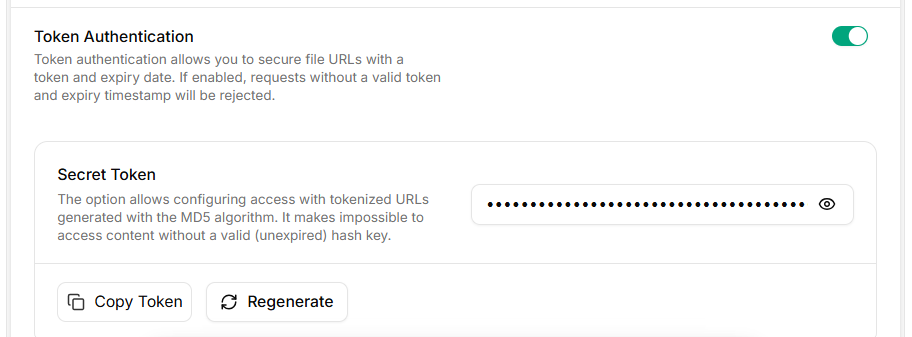
Token Authentication
- Open CDN → Distributions → select your distribution.
- Go to Access Rules → Add Access Rules (or open an existing rule).
- Set the Match Pattern to the path you want to protect (for example
/videos/*). - Toggle Token Authentication on.
- Click Generate Token to mint a Secret Token, then Copy Token.
- Click Create Access Rules to save.
Token authentication is configured per access rule, not globally. Each rule has its own secret, so you can scope tokens to a path prefix and rotate them independently.
URL anatomy
Signing algorithm
- Build the string
{expires}{path} {secret}— note the single space before the secret. - MD5 hash with raw binary output (16 bytes), not hex.
- Base64-encode the binary hash.
- Make the base64 URL-safe: replace
+→-,/→_, strip=padding. - Append
?md5={token}&expires={unix_timestamp}to the CDN URL.
Configuration
Drive everything from environment variables — never hard-code the secret..env
Generate signed URLs
Verify with curl
Mint a URL, hit the edge, expect200:
403:
Use the URL in a player
The signed URL is a normal HTTPS URL — drop it into any player. For HLS streams, sign the manifest only; segments inherit the rule as long as the Match Pattern covers them.Operations
Choosing a TTL
Set TTL ≥ longest possible playback session. If a viewer pauses past the expiry, the next segment fetch returns
403 and the player stalls.
Clock skew
expires is compared against the edge’s wall clock. Servers signing URLs should run NTP. If your sign host drifts ahead, the edge sees a token that is “already expired”; if it drifts behind, tokens live longer than expected. A skew of ±60 seconds is usually invisible — anything more is a config issue.
Rotating the secret
The console only stores one active secret per access rule. Rotation is a hard cutover, so do it at low traffic and keep a short overlap by issuing short-TTL tokens leading up to the swap.Multiple environments
Use one access rule per environment with its own secret and a path prefix that namespaces traffic — for example/prod/* and /staging/*. That way a leaked staging secret cannot sign production URLs.
Logging and observability
- Log the path you signed and expires value, never the secret or the full signed URL — query strings often end up in access logs.
- Track edge
403rate per access rule. A spike usually means clock skew, expired tokens, or a bug in your signer. - For incident triage, keep the signing function pure (input in, URL out) so you can replay it offline against suspect timestamps.
Security checklist
- Secret stored in a secret manager, injected via env var.
- Signing happens only on the server. No browser code, no mobile-client embedded secrets.
- Per-environment access rules with distinct secrets.
- TTL is the shortest value your workload tolerates.
- Rotation runbook documented and tested.
- Application auth gates the signer endpoint — never let an unauthenticated request mint a URL.
- Combine with Referrer, IP, or Country policies for defense in depth.