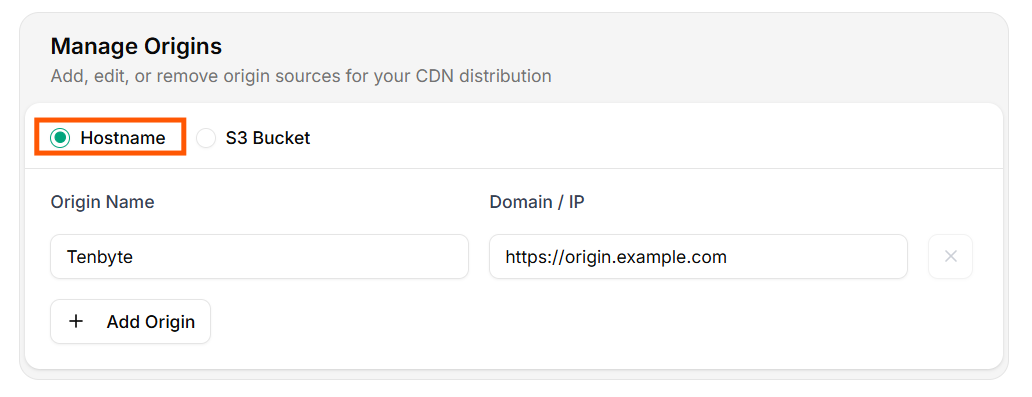
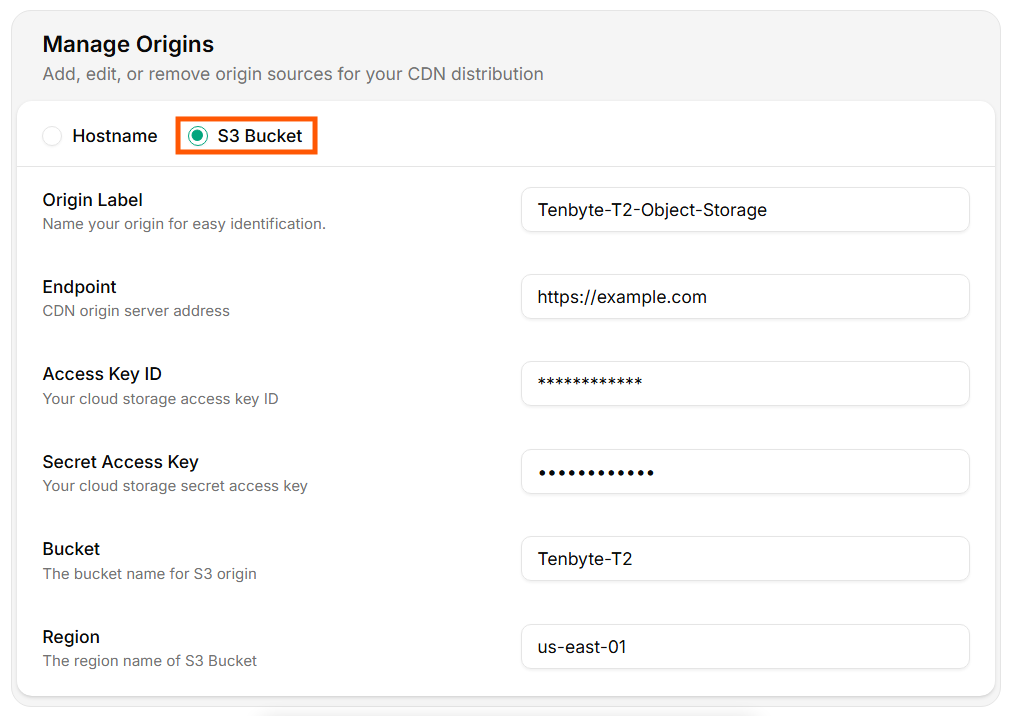
The origin is the upstream Tenbyte CDN pulls from on cache miss. You can attach a hostname/IP or an S3-compatible bucket. The edge then caches the response per your rules.

Origin types

TypeWhen to use
HostnameWeb servers, app servers, load balancers, anywhere reachable by HTTP(S).
S3 BucketAWS S3, Cloudflare R2, DigitalOcean Spaces, Tenbyte T2 Object Storage, MinIO — anything S3-compatible.

Hostname origin

Origin
FieldNotes
Origin LabelInternal identifier for logs and dashboards.
Domain / IPFQDN (origin.example.com) or IP. The edge talks HTTPS by default.
Verify reachability before saving:
curl -sSI "https://origin.example.com/healthz"
# expect 200 OK
If the origin uses virtual hosting or has a TLS cert for a different name, set a custom Host header in Headers.

S3-compatible origin

Origin
FieldExample
Origin Labelprod-assets-s3
Endpoint / Hostnames3.us-east-1.amazonaws.com
Access Key IDfrom your IAM user / service account
Secret Access Keyinjected once, stored encrypted
Bucketbucket name only, no path
Regionbucket region (us-east-1, eu-west-1, etc.)

Endpoint cheat sheet

ProviderEndpoint
AWS S3 (regional)s3.<region>.amazonaws.com
Cloudflare R2<account-id>.r2.cloudflarestorage.com
DigitalOcean Spaces<region>.digitaloceanspaces.com
Backblaze B2 (S3 API)s3.<region>.backblazeb2.com
Tenbyte T2s3.tenbyte.io
MinIOyour MinIO host

Least-privilege IAM

Use a read-only key scoped to the bucket / prefix you’re serving. Example AWS policy:
{
  "Version": "2012-10-17",
  "Statement": [
    {
      "Effect": "Allow",
      "Action": ["s3:GetObject", "s3:ListBucket"],
      "Resource": [
        "arn:aws:s3:::my-bucket",
        "arn:aws:s3:::my-bucket/*"
      ]
    }
  ]
}

Verify before saving

aws s3 ls "s3://my-bucket/" \
  --endpoint-url "https://s3.us-east-1.amazonaws.com" \
  --region us-east-1

aws s3api get-object \
  --bucket my-bucket --key index.html \
  --endpoint-url "https://s3.us-east-1.amazonaws.com" \
  --region us-east-1 /tmp/out.html
If both work locally with the same key, the CDN will work too.

Update origins

After editing fields, click Update Origins.
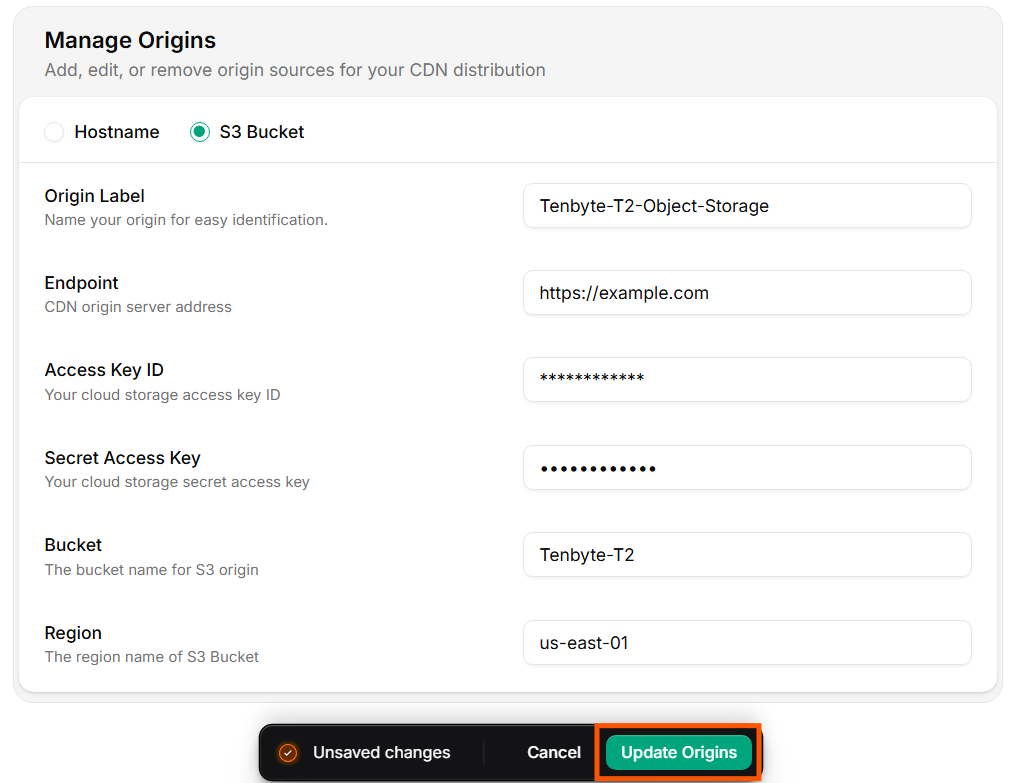
Update your Origin
Distribution status flips to Updating until the new config rolls out (usually under a minute).

Manage via API

# Read current origin
curl -sS "https://api.tenbyte.io/cdn/distributions/$DISTRIBUTION_ID/origins" \
  -H "Authorization: Bearer $TENBYTE_API_TOKEN" | jq

# Replace origin
curl -X PUT "https://api.tenbyte.io/cdn/distributions/$DISTRIBUTION_ID/origins" \
  -H "Authorization: Bearer $TENBYTE_API_TOKEN" \
  -H "Content-Type: application/json" \
  -d '{
    "type": "s3",
    "label": "prod-assets-s3",
    "hostname": "s3.us-east-1.amazonaws.com",
    "bucket": "my-bucket",
    "region": "us-east-1",
    "access_key_id": "AKIA...",
    "secret_access_key": "..."
  }'
See CDN API reference for the exact field names.

Rotate S3 keys safely

  1. Create a new key pair on the IAM user (so two keys are active).
  2. Update the origin via the console or API with the new key.
  3. Confirm x-cache: HIT and a clean MISS → HIT transition for a fresh path.
  4. Deactivate / delete the old key in IAM.

Failure modes

SymptomLikely cause
502 Bad Gateway from CDNOrigin unreachable, port closed, TLS handshake failure.
403 from S3 originKey missing s3:GetObject or bucket policy denies.
404 for a known objectBucket name wrong, region mismatch, or path includes the bucket prefix twice.
Origin returns content but CDN serves nothingOrigin sent Cache-Control: private and Never Cache is also set. Check cache rules.
Wrong vhost servedHost header missing — configure it in Headers.