Documentation Index
Fetch the complete documentation index at: https://docs.tenbyte.io/llms.txt
Use this file to discover all available pages before exploring further.
Header rules let you rewrite, add, or strip HTTP headers at the edge — without touching your origin. Use them for routing (Host), browser policy (CORS, security headers), and observability (request tagging).
| Type | Direction | Common use |
|---|
| Host header | Edge → origin | Virtual hosting, SNI matching. |
| CORS | Edge → browser | Allow cross-origin XHR / fetch. |
| Request header | Edge → origin | Tag requests, forward auth tokens. |
| Response header | Edge → browser | Cache-control, security, custom branding. |
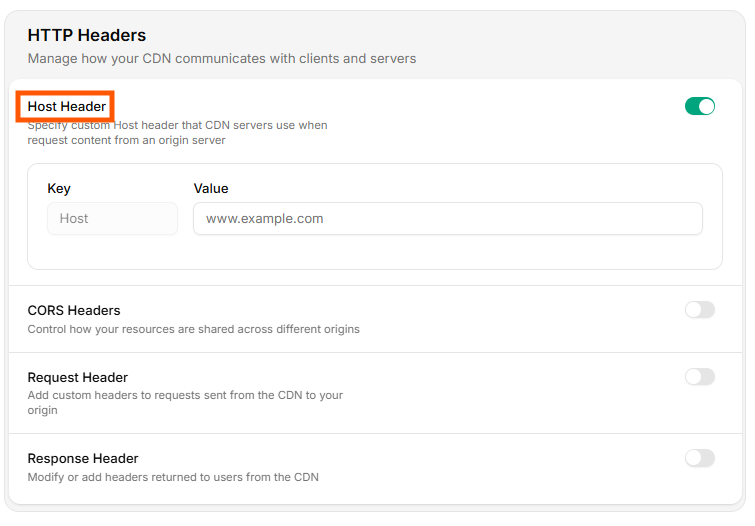
Toggle Host Header on, then set:
| Field | Example |
|---|
| Key | Host |
| Value | origin.example.com |
Set this when your origin uses virtual hosting or its TLS cert is for a name other than the distribution hostname.
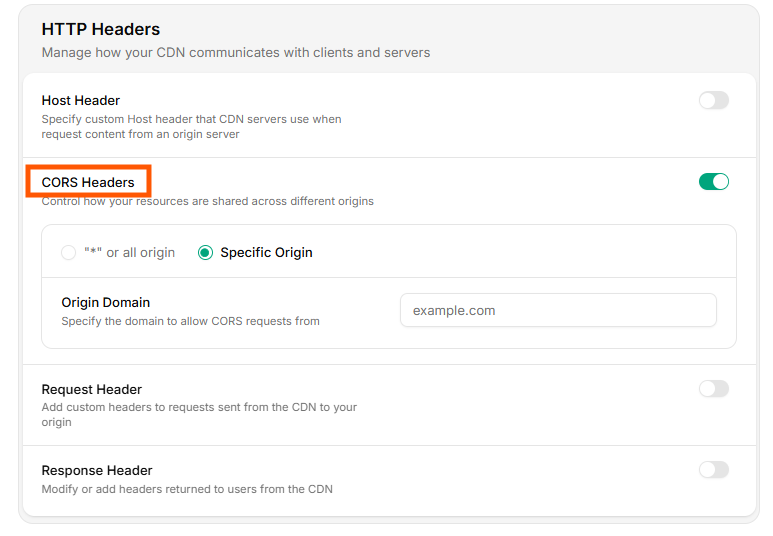
Toggle CORS Headers on. Pick:
* — allow any origin (fine for fully public assets).
- Specify Origin — allowlist a domain (e.g.
https://app.yoursite.com). The CDN echoes that exact origin in Access-Control-Allow-Origin only when the request matches.
Don’t use * for any URL that requires credentials (cookies, Authorization header). Browsers block credentialed cross-origin requests against *. Use a specific origin.
Verify with curl:
curl -sSI -H "Origin: https://app.yoursite.com" "$CDN_HOST/api/data" \
| grep -i 'access-control'
Expected:
access-control-allow-origin: https://app.yoursite.com
access-control-allow-methods: GET, POST, OPTIONS
Toggle Request Header on, click Add Header, then set name + value. The header is added to every origin fetch.
Use cases:
- Tagging —
X-Edge-Pop: <auto> for log correlation.
- Auth forwarding — pin an
Authorization: Bearer ... for a private origin.
- Routing —
X-Tenant: prod so a multi-tenant origin picks the right backend.
Add Header → "X-CDN-Source": "tenbyte"
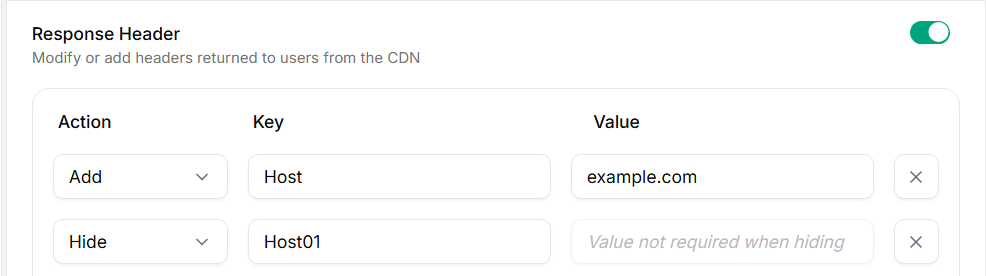
Two actions:
| Action | Effect |
|---|
| Add | Append a header on the way out (overrides origin if same name). |
| Hide | Strip a header from the response (e.g. Server, X-Powered-By). |
A reasonable baseline for static / SPA distributions:
| Header | Value |
|---|
Strict-Transport-Security | max-age=31536000; includeSubDomains; preload |
X-Content-Type-Options | nosniff |
X-Frame-Options | DENY |
Referrer-Policy | strict-origin-when-cross-origin |
Permissions-Policy | geolocation=(), camera=(), microphone=() |
Content-Security-Policy | App-specific; start with default-src 'self'. |
Verify:
curl -sSI "$CDN_HOST/" | grep -iE 'strict-transport|x-content|x-frame|referrer|permissions|content-security'
Hide → "Server"
Hide → "X-Powered-By"
These leak origin software versions. Strip them at the edge.
Add Cache-Control at the edge to override or supplement origin headers:
| Asset class | Cache-Control |
|---|
| Hashed JS / CSS | public, max-age=31536000, immutable |
| HTML entry point | public, max-age=60, must-revalidate |
| Private API JSON | private, no-store |
For path-specific TTLs, prefer Cache rules — they affect the edge cache, while a Cache-Control response header instructs the browser.
Manage via API
curl -X PUT "https://api.tenbyte.io/cdn/distributions/$DISTRIBUTION_ID/headers" \
-H "Authorization: Bearer $TENBYTE_API_TOKEN" \
-H "Content-Type: application/json" \
-d '{
"host": {"enabled": true, "value": "origin.example.com"},
"cors": {"enabled": true, "origin": "https://app.yoursite.com"},
"response_add": [
{"name": "Strict-Transport-Security", "value": "max-age=31536000; includeSubDomains"},
{"name": "X-Content-Type-Options", "value": "nosniff"}
],
"response_hide": ["Server", "X-Powered-By"]
}'
See the CDN API reference for the canonical schema.
Troubleshooting
| Symptom | Fix |
|---|
CORS preflight fails (OPTIONS returns no headers) | Add OPTIONS to allowed methods, or enable CORS Headers. |
| Browser blocks credentialed request | Replace * with a specific origin and add Access-Control-Allow-Credentials: true via response header. |
| Origin gets wrong vhost | Host header missing or wrong. |
| Security header missing on some paths | Header rules apply distribution-wide; check for cache-poisoned responses cached before the rule was added — purge the path. |