

SSL types
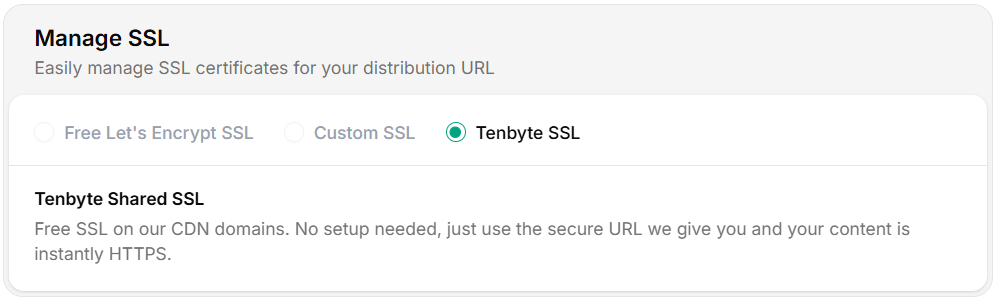
Choose Your SSL Type
Provision a certificate
Tenbyte SSL (free)
Auto-issued for the system-generated hostname. Nothing to configure.Let’s Encrypt
- Pick Let’s Encrypt as the SSL type.
- Confirm the custom domain CNAMEs to your distribution:
- Click Issue certificate. Validation runs automatically.
- Status moves from
Pending→Activeonce issued. Auto-renewal handles future cycles.
Custom SSL
Upload an existing cert. See Custom Certificates for the full upload flow and PEM format.Verify the cert
https://www.ssllabs.com/ssltest/) gives you a deeper grade.
Additional SSL settings
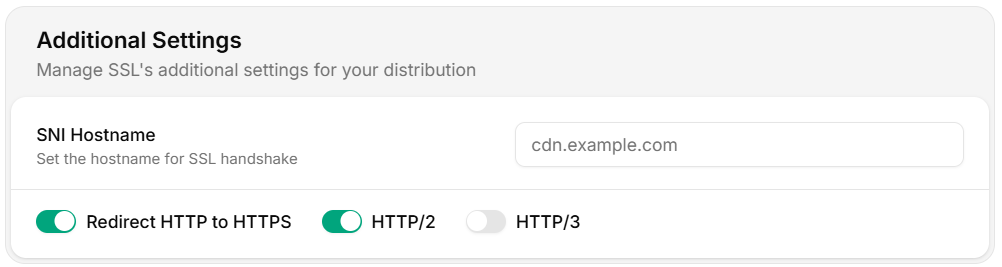
Additional Settings
Verify the protocol
Renewal and rotation
For custom certs, set a calendar reminder 30 days before
notAfter and a hard alert 7 days before.
Operational tips
- Mixed-content audits — once HTTPS redirect is on, scan your site for
http://asset URLs. - HSTS — add
Strict-Transport-Securityvia response headers only after you’re sure all subdomains are HTTPS. - Cipher / version — Tenbyte CDN serves TLS 1.2 and 1.3 with modern cipher suites. Older clients (XP, ancient Android) won’t connect.
- Origin TLS — the edge talks TLS to your origin too. If you use a self-signed cert, mark the origin as such; otherwise the cert must validate.