> ## Documentation Index
> Fetch the complete documentation index at: https://docs.tenbyte.io/llms.txt
> Use this file to discover all available pages before exploring further.
# Adaptive Bitrate Streaming
Adaptive Bitrate Streaming (ABR) delivers the best possible video quality based on each viewer’s network conditions. Vidinfra automatically generates multiple resolutions during transcoding and streams them using **`HLS`** and **`DASH`**, ensuring smooth playback with minimal buffering.
ABR is a core part of Tenbyte’s video delivery workflow, improving performance across devices and adapting reliably to changing network speeds, especially on mobile connections.
## Open Transcoding Settings
* From the left sidebar, open the Settings dropdown and select Transcoding.
* This opens the transcoding dashboard, where you will see the default transcoding profile.
* To edit it, click the three-dot menu next to the profile and choose **Edit**.
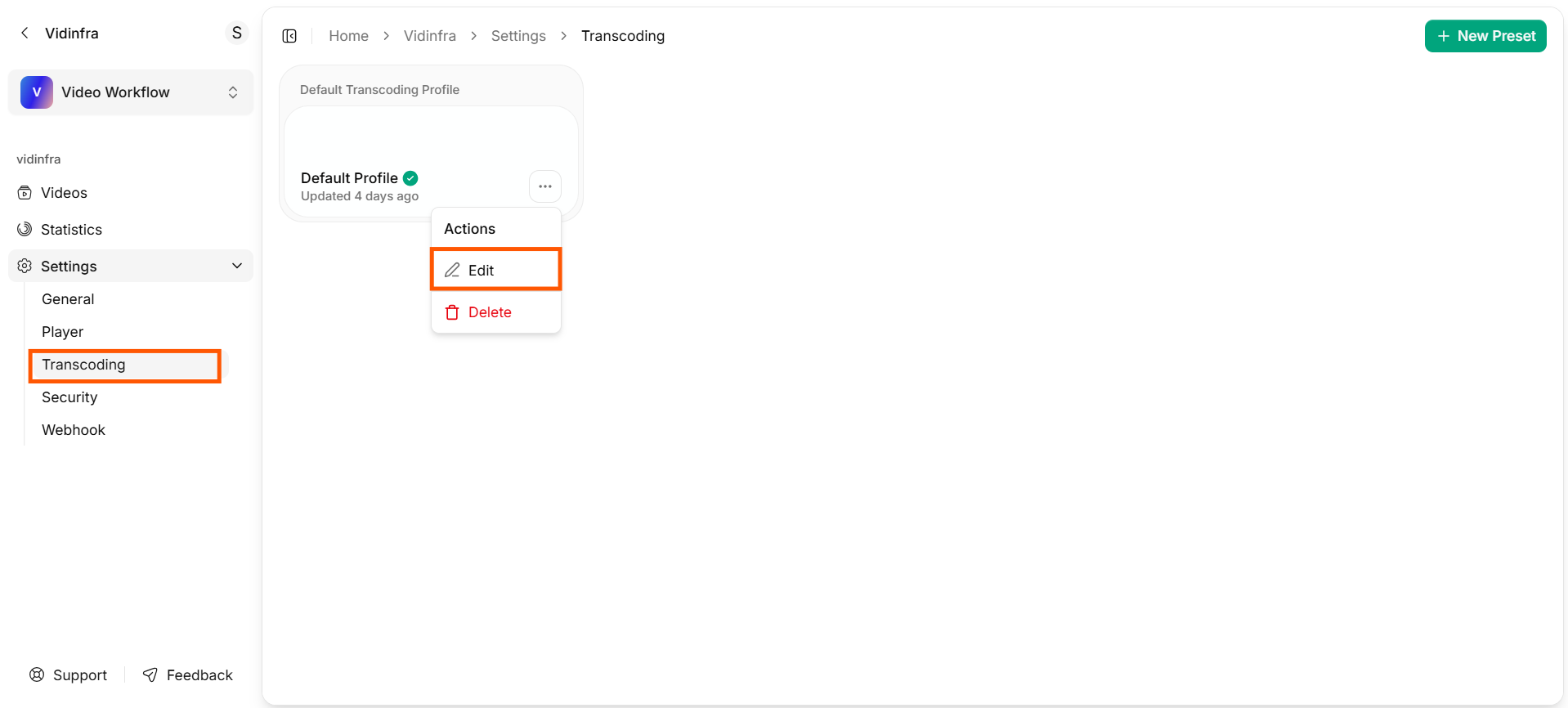 * You will be taken to a new dashboard where you can adjust all transcoding options.
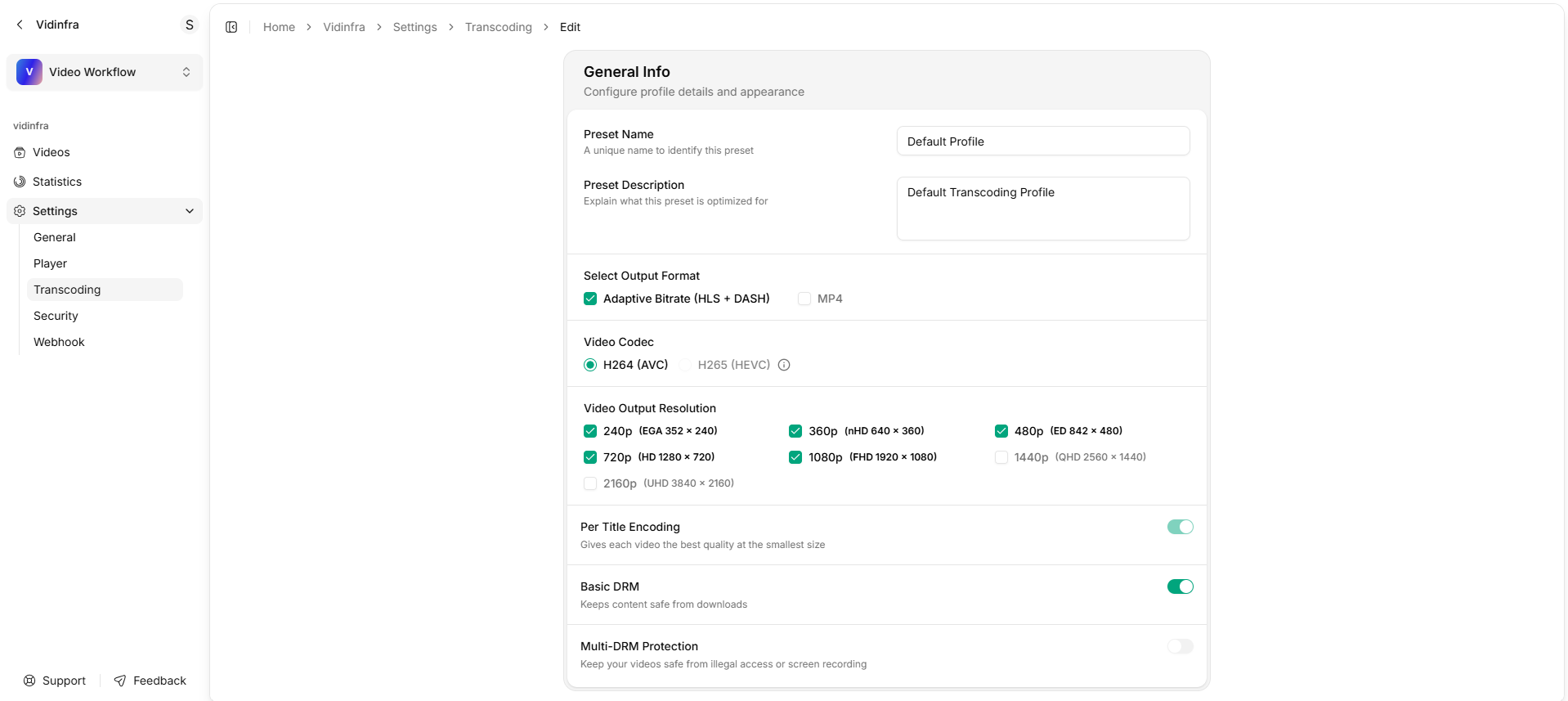 ### Preset Name
Enter a unique name to identify this transcoding preset.
### Preset Description
Add a short description that explains what the preset is optimized for.
***
## ABR in Vidinfra
When Adaptive Bitrate (**`HLS`** + **`DASH`**) is selected in the transcoding profile:
* Vidinfra creates multiple output resolutions (e.g., **`240p`**, **`360p`**, **`480p`**, **`720p`**, **`1080p`**).
* Each resolution is encoded separately using the selected codec (**`H.264`** or **`H.265`**).
* The player automatically switches between these qualities during playback.
* Viewers on strong networks get high-quality video, while slower networks receive lower resolutions for uninterrupted viewing.
### Preset Name
Enter a unique name to identify this transcoding preset.
### Preset Description
Add a short description that explains what the preset is optimized for.
***
## ABR in Vidinfra
When Adaptive Bitrate (**`HLS`** + **`DASH`**) is selected in the transcoding profile:
* Vidinfra creates multiple output resolutions (e.g., **`240p`**, **`360p`**, **`480p`**, **`720p`**, **`1080p`**).
* Each resolution is encoded separately using the selected codec (**`H.264`** or **`H.265`**).
* The player automatically switches between these qualities during playback.
* Viewers on strong networks get high-quality video, while slower networks receive lower resolutions for uninterrupted viewing.
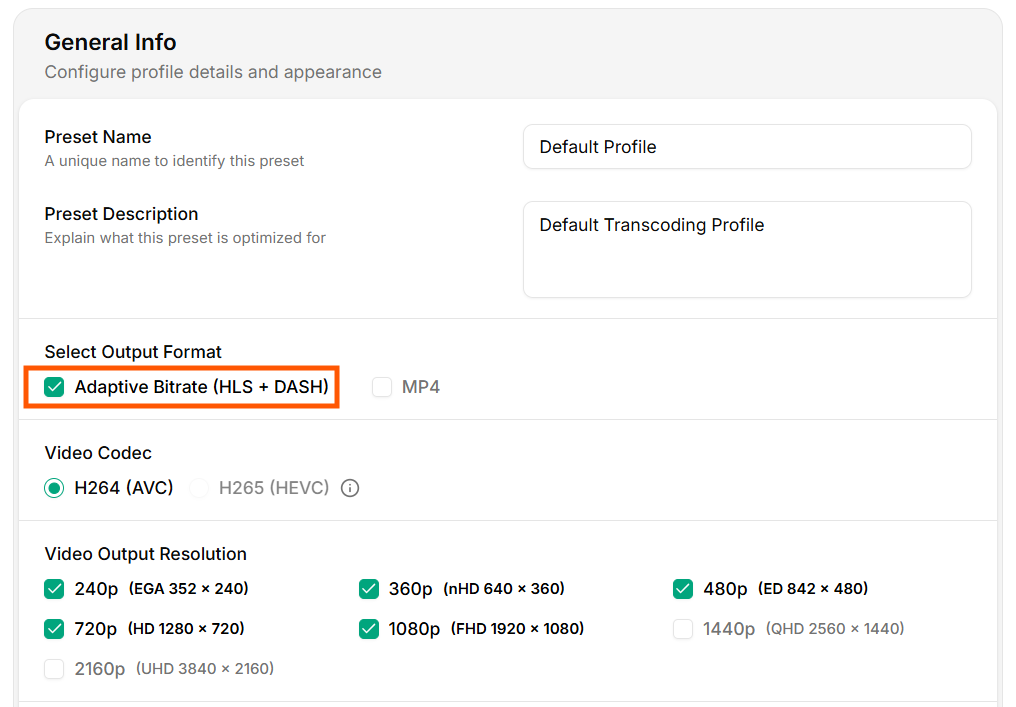 ABR in Vidinfra uses:
1. **`HLS`** (HTTP Live Streaming)
2. **`DASH`** (Dynamic Adaptive Streaming over HTTP)
These formats allow the player to request segments of different qualities in real time based on available bandwidth.
### Video Codec
A video codec compresses a video into a smaller file for storage and streaming, then decompresses it during playback so the viewer can watch it smoothly.
ABR in Vidinfra uses:
1. **`HLS`** (HTTP Live Streaming)
2. **`DASH`** (Dynamic Adaptive Streaming over HTTP)
These formats allow the player to request segments of different qualities in real time based on available bandwidth.
### Video Codec
A video codec compresses a video into a smaller file for storage and streaming, then decompresses it during playback so the viewer can watch it smoothly.
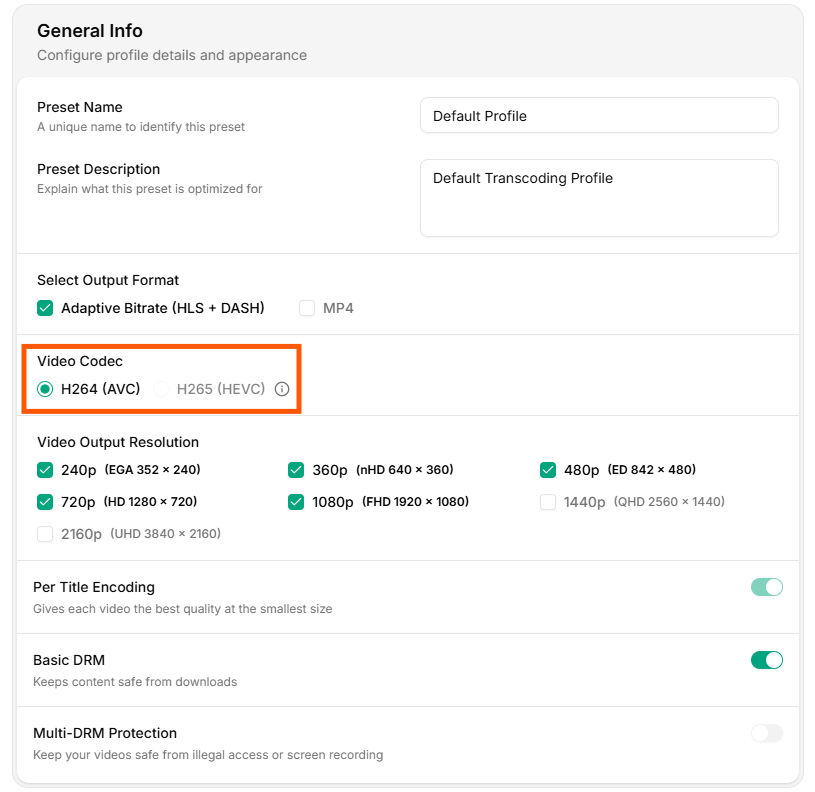 1. `H.264` (AVC)
`H.264` is the default codec used in Vidinfra. It offers a strong balance between video quality and file size and is supported across all major devices, browsers, and players.
2. `H.265` (HEVC)
`H.265` provides higher compression efficiency compared to H.264, meaning it can deliver similar quality at a smaller file size.
### Video Output Resolution
Vidinfra lets you choose the set of resolutions generated during transcoding.
1. `H.264` (AVC)
`H.264` is the default codec used in Vidinfra. It offers a strong balance between video quality and file size and is supported across all major devices, browsers, and players.
2. `H.265` (HEVC)
`H.265` provides higher compression efficiency compared to H.264, meaning it can deliver similar quality at a smaller file size.
### Video Output Resolution
Vidinfra lets you choose the set of resolutions generated during transcoding.
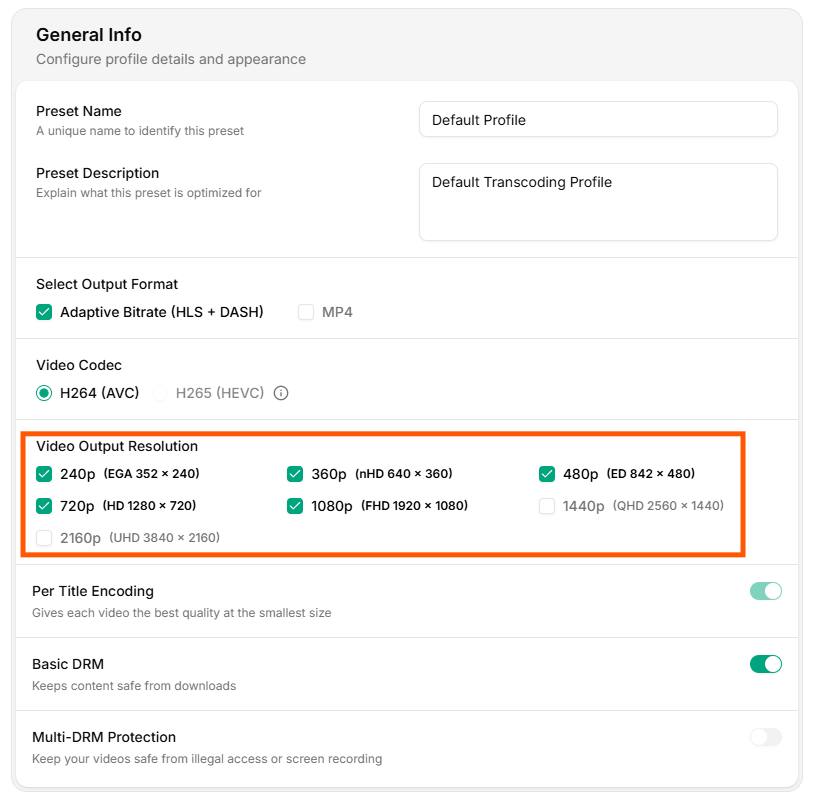 Available output options include:
1. **240p (EGA 352 × 240)**: Ideal for low-bandwidth environments and basic mobile connectivity.
2. **360p (nHD 640 × 360)**: Good for medium-bandwidth users while keeping file sizes small.
3. **480p (ED 842 × 480)**: Standard-definition quality suitable for most general-purpose playback.
4. **720p (HD 1280 × 720)**: High-definition output for users with stable network connections.
5. **1080p (FHD 1920 × 1080)**: Full HD resolution for high-quality viewing on larger screens.
6. **1440p (QHD 2560 × 1440)**: Quad HD quality that offers sharper detail than 1080p.
7. **2160p (UHD 3840 × 2160)**: Ultra HD resolution designed for premium viewing.
### Per-Title Encoding
It analyzes each video and adjusts the bitrate ladder, so that every resolution uses the lowest possible bitrate without losing quality.
Available output options include:
1. **240p (EGA 352 × 240)**: Ideal for low-bandwidth environments and basic mobile connectivity.
2. **360p (nHD 640 × 360)**: Good for medium-bandwidth users while keeping file sizes small.
3. **480p (ED 842 × 480)**: Standard-definition quality suitable for most general-purpose playback.
4. **720p (HD 1280 × 720)**: High-definition output for users with stable network connections.
5. **1080p (FHD 1920 × 1080)**: Full HD resolution for high-quality viewing on larger screens.
6. **1440p (QHD 2560 × 1440)**: Quad HD quality that offers sharper detail than 1080p.
7. **2160p (UHD 3840 × 2160)**: Ultra HD resolution designed for premium viewing.
### Per-Title Encoding
It analyzes each video and adjusts the bitrate ladder, so that every resolution uses the lowest possible bitrate without losing quality.
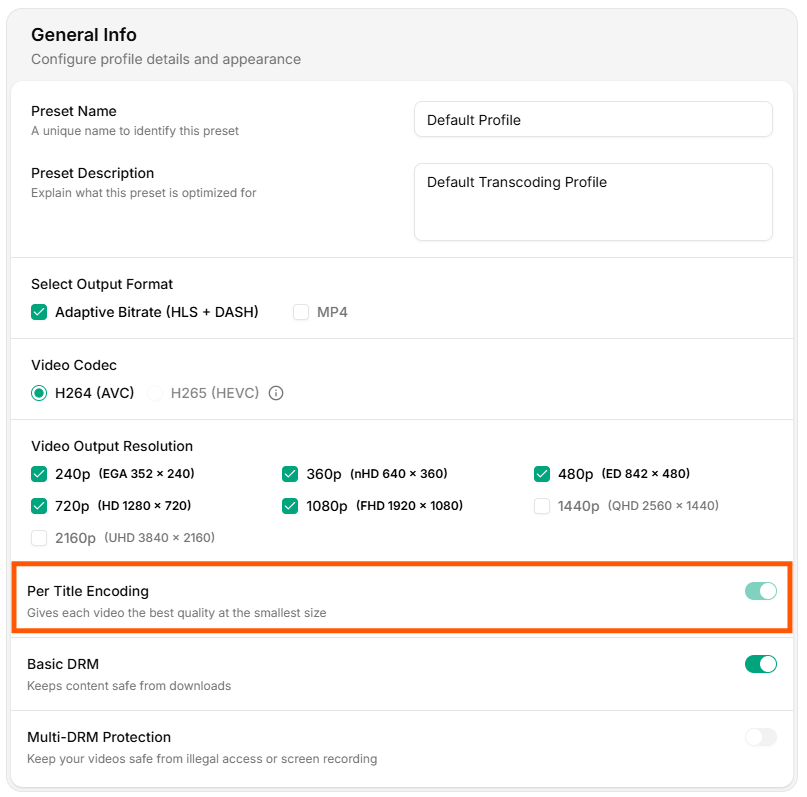 Per-Title Encoding is not ABR, but it fine-tunes the quality and bitrate of each ABR resolution to deliver the best visual result at a smaller file size.