> ## Documentation Index
> Fetch the complete documentation index at: https://docs.tenbyte.io/llms.txt
> Use this file to discover all available pages before exploring further.
# SSL Management
> Issue or upload SSL certificates, configure SNI, force HTTPS, and enable HTTP/2 / HTTP/3 on your distribution.
Every Tenbyte CDN distribution serves over TLS. You pick how the cert is provisioned and tune protocol-level options like SNI, redirects, and HTTP/2 / HTTP/3.
## SSL types
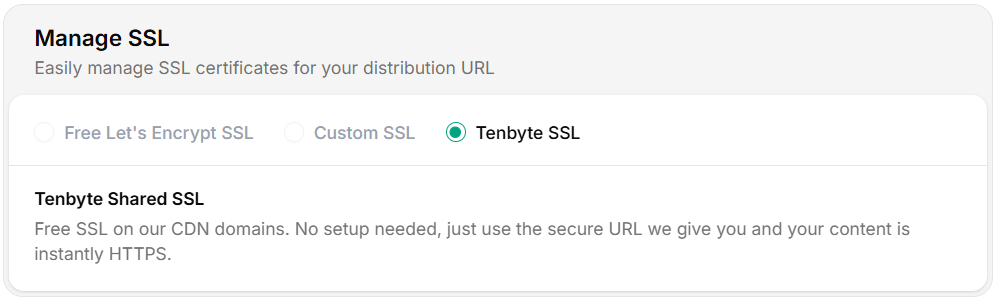 | Type | DNS validation | Best for |
| ---------------------- | -------------------------------------- | ----------------------------------------------------------- |
| **Tenbyte SSL (Free)** | Automatic | System-generated `*.tenbytecdn.com` host. Zero setup. |
| **Let's Encrypt** | Domain validation via HTTP-01 / DNS-01 | Custom domains where you control DNS. Free, auto-renews. |
| **Custom SSL** | You manage | Bring-your-own cert (EV, wildcard, internal CA, multi-SAN). |
## Provision a certificate
### Tenbyte SSL (free)
Auto-issued for the system-generated hostname. Nothing to configure.
### Let's Encrypt
1. Pick **Let's Encrypt** as the SSL type.
2. Confirm the custom domain CNAMEs to your distribution:
```bash theme={null}
dig +short cdn.yoursite.com CNAME
# cdn.yoursite.com. CNAME your-distribution.tenbytecdn.com.
```
3. Click **Issue certificate**. Validation runs automatically.
4. Status moves from `Pending` → `Active` once issued. Auto-renewal handles future cycles.
### Custom SSL
Upload an existing cert. See [Custom Certificates](/docs/cdn/certificates/custom-certificates) for the full upload flow and PEM format.
## Verify the cert
```bash theme={null}
openssl s_client -connect cdn.yoursite.com:443 -servername cdn.yoursite.com /dev/null | openssl x509 -noout -subject -issuer -dates
```
Expected output:
```text theme={null}
subject=CN = cdn.yoursite.com
issuer=C = US, O = Let's Encrypt, CN = R3
notBefore=May 9 00:00:00 2026 GMT
notAfter=Aug 7 23:59:59 2026 GMT
```
For browsers, hit the URL and check the lock icon. SSL Labs (`https://www.ssllabs.com/ssltest/`) gives you a deeper grade.
## Additional SSL settings
| Type | DNS validation | Best for |
| ---------------------- | -------------------------------------- | ----------------------------------------------------------- |
| **Tenbyte SSL (Free)** | Automatic | System-generated `*.tenbytecdn.com` host. Zero setup. |
| **Let's Encrypt** | Domain validation via HTTP-01 / DNS-01 | Custom domains where you control DNS. Free, auto-renews. |
| **Custom SSL** | You manage | Bring-your-own cert (EV, wildcard, internal CA, multi-SAN). |
## Provision a certificate
### Tenbyte SSL (free)
Auto-issued for the system-generated hostname. Nothing to configure.
### Let's Encrypt
1. Pick **Let's Encrypt** as the SSL type.
2. Confirm the custom domain CNAMEs to your distribution:
```bash theme={null}
dig +short cdn.yoursite.com CNAME
# cdn.yoursite.com. CNAME your-distribution.tenbytecdn.com.
```
3. Click **Issue certificate**. Validation runs automatically.
4. Status moves from `Pending` → `Active` once issued. Auto-renewal handles future cycles.
### Custom SSL
Upload an existing cert. See [Custom Certificates](/docs/cdn/certificates/custom-certificates) for the full upload flow and PEM format.
## Verify the cert
```bash theme={null}
openssl s_client -connect cdn.yoursite.com:443 -servername cdn.yoursite.com /dev/null | openssl x509 -noout -subject -issuer -dates
```
Expected output:
```text theme={null}
subject=CN = cdn.yoursite.com
issuer=C = US, O = Let's Encrypt, CN = R3
notBefore=May 9 00:00:00 2026 GMT
notAfter=Aug 7 23:59:59 2026 GMT
```
For browsers, hit the URL and check the lock icon. SSL Labs (`https://www.ssllabs.com/ssltest/`) gives you a deeper grade.
## Additional SSL settings
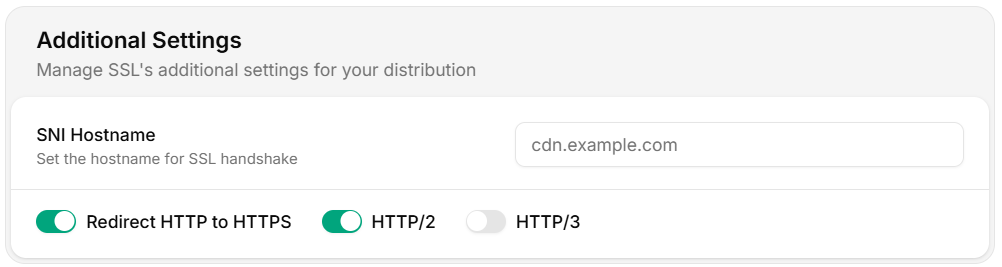 | Setting | What it does | When to use |
| ------------------------- | ---------------------------------------------- | ---------------------------------------------------------------------------- |
| **SNI Hostname** | Sent during the TLS handshake. | Set if your origin's TLS cert doesn't match the distribution hostname. |
| **Redirect HTTP → HTTPS** | Sends `301` for any plain-HTTP request. | Always on for production. |
| **HTTP/2** | Multiplexed connections. | Always on — universally supported. |
| **HTTP/3 (QUIC)** | UDP-based transport, faster on lossy networks. | On for end-user-facing distributions; off if you have strict-firewall users. |
### Verify the protocol
```bash theme={null}
# HTTP/2
curl --http2 -o /dev/null -sS -w 'HTTP version: %{http_version}\n' "https://cdn.yoursite.com/"
# HTTP/3
curl --http3 -o /dev/null -sS -w 'HTTP version: %{http_version}\n' "https://cdn.yoursite.com/"
```
## Renewal and rotation
| Cert type | Renewal |
| ------------- | ------------------------------------------------------------------------------------ |
| Tenbyte SSL | Automatic. No action needed. |
| Let's Encrypt | Automatic, \~30 days before expiry. Failures emit a webhook. |
| Custom SSL | **You** are responsible. Watch `notAfter` and upload the new cert before it expires. |
For custom certs, set a calendar reminder 30 days before `notAfter` and a hard alert 7 days before.
## Operational tips
* **Mixed-content audits** — once HTTPS redirect is on, scan your site for `http://` asset URLs.
* **HSTS** — add `Strict-Transport-Security` via [response headers](/docs/cdn/distributions/headers) only after you're sure all subdomains are HTTPS.
* **Cipher / version** — Tenbyte CDN serves TLS 1.2 and 1.3 with modern cipher suites. Older clients (XP, ancient Android) won't connect.
* **Origin TLS** — the edge talks TLS to your origin too. If you use a self-signed cert, mark the origin as such; otherwise the cert must validate.
## Troubleshooting
| Symptom | Fix |
| --------------------------- | ----------------------------------------------------------------------------------------- |
| Cert stuck at `Pending` | DNS not resolving to the distribution. Confirm CNAME and wait for TTL to expire. |
| Browser shows cert mismatch | SNI Hostname misconfigured, or DNS resolves to a different distribution. |
| Origin handshake fails | Set the SNI Hostname to match the origin's cert CN. |
| Mixed-content warnings | Your HTML still references `http://...` assets. Update or rely on protocol-relative URLs. |
| HTTP/3 not negotiated | Client or network blocks UDP/443. Falls back to HTTP/2 silently. |
| Setting | What it does | When to use |
| ------------------------- | ---------------------------------------------- | ---------------------------------------------------------------------------- |
| **SNI Hostname** | Sent during the TLS handshake. | Set if your origin's TLS cert doesn't match the distribution hostname. |
| **Redirect HTTP → HTTPS** | Sends `301` for any plain-HTTP request. | Always on for production. |
| **HTTP/2** | Multiplexed connections. | Always on — universally supported. |
| **HTTP/3 (QUIC)** | UDP-based transport, faster on lossy networks. | On for end-user-facing distributions; off if you have strict-firewall users. |
### Verify the protocol
```bash theme={null}
# HTTP/2
curl --http2 -o /dev/null -sS -w 'HTTP version: %{http_version}\n' "https://cdn.yoursite.com/"
# HTTP/3
curl --http3 -o /dev/null -sS -w 'HTTP version: %{http_version}\n' "https://cdn.yoursite.com/"
```
## Renewal and rotation
| Cert type | Renewal |
| ------------- | ------------------------------------------------------------------------------------ |
| Tenbyte SSL | Automatic. No action needed. |
| Let's Encrypt | Automatic, \~30 days before expiry. Failures emit a webhook. |
| Custom SSL | **You** are responsible. Watch `notAfter` and upload the new cert before it expires. |
For custom certs, set a calendar reminder 30 days before `notAfter` and a hard alert 7 days before.
## Operational tips
* **Mixed-content audits** — once HTTPS redirect is on, scan your site for `http://` asset URLs.
* **HSTS** — add `Strict-Transport-Security` via [response headers](/docs/cdn/distributions/headers) only after you're sure all subdomains are HTTPS.
* **Cipher / version** — Tenbyte CDN serves TLS 1.2 and 1.3 with modern cipher suites. Older clients (XP, ancient Android) won't connect.
* **Origin TLS** — the edge talks TLS to your origin too. If you use a self-signed cert, mark the origin as such; otherwise the cert must validate.
## Troubleshooting
| Symptom | Fix |
| --------------------------- | ----------------------------------------------------------------------------------------- |
| Cert stuck at `Pending` | DNS not resolving to the distribution. Confirm CNAME and wait for TTL to expire. |
| Browser shows cert mismatch | SNI Hostname misconfigured, or DNS resolves to a different distribution. |
| Origin handshake fails | Set the SNI Hostname to match the origin's cert CN. |
| Mixed-content warnings | Your HTML still references `http://...` assets. Update or rely on protocol-relative URLs. |
| HTTP/3 not negotiated | Client or network blocks UDP/443. Falls back to HTTP/2 silently. |