> ## Documentation Index
> Fetch the complete documentation index at: https://docs.tenbyte.io/llms.txt
> Use this file to discover all available pages before exploring further.
# Manage your CDN Origins
> Connect a hostname or S3-compatible bucket as your distribution origin. Includes connectivity checks, IAM scoping, and failure modes.
The **origin** is the upstream Tenbyte CDN pulls from on cache miss. You can attach a hostname/IP or an S3-compatible bucket. The edge then caches the response per your rules.
## Origin types
| Type | When to use |
| ------------- | ------------------------------------------------------------------------------------------------------ |
| **Hostname** | Web servers, app servers, load balancers, anywhere reachable by HTTP(S). |
| **S3 Bucket** | AWS S3, Cloudflare R2, DigitalOcean Spaces, Tenbyte T2 Object Storage, MinIO — anything S3-compatible. |
## Hostname origin
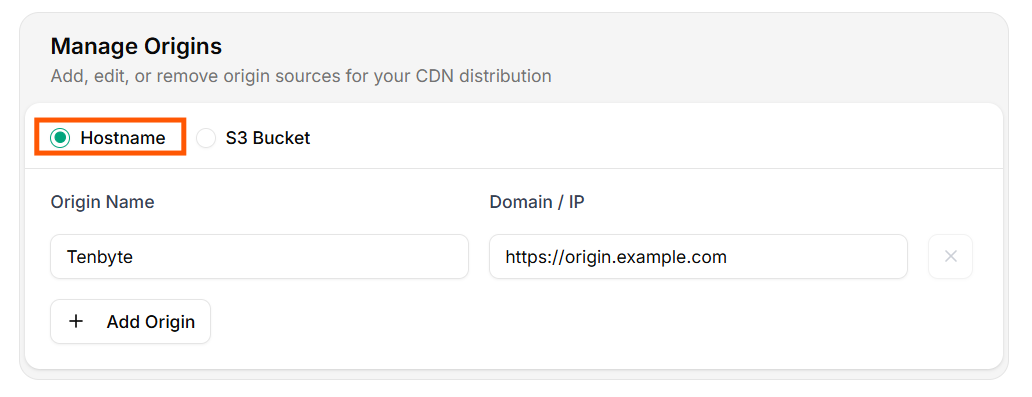 | Field | Notes |
| ---------------- | ------------------------------------------------------------------- |
| **Origin Label** | Internal identifier for logs and dashboards. |
| **Domain / IP** | FQDN (`origin.example.com`) or IP. The edge talks HTTPS by default. |
Verify reachability before saving:
```bash theme={null}
curl -sSI "https://origin.example.com/healthz"
# expect 200 OK
```
If the origin uses virtual hosting or has a TLS cert for a different name, set a custom **Host header** in [Headers](/docs/cdn/distributions/headers).
## S3-compatible origin
| Field | Notes |
| ---------------- | ------------------------------------------------------------------- |
| **Origin Label** | Internal identifier for logs and dashboards. |
| **Domain / IP** | FQDN (`origin.example.com`) or IP. The edge talks HTTPS by default. |
Verify reachability before saving:
```bash theme={null}
curl -sSI "https://origin.example.com/healthz"
# expect 200 OK
```
If the origin uses virtual hosting or has a TLS cert for a different name, set a custom **Host header** in [Headers](/docs/cdn/distributions/headers).
## S3-compatible origin
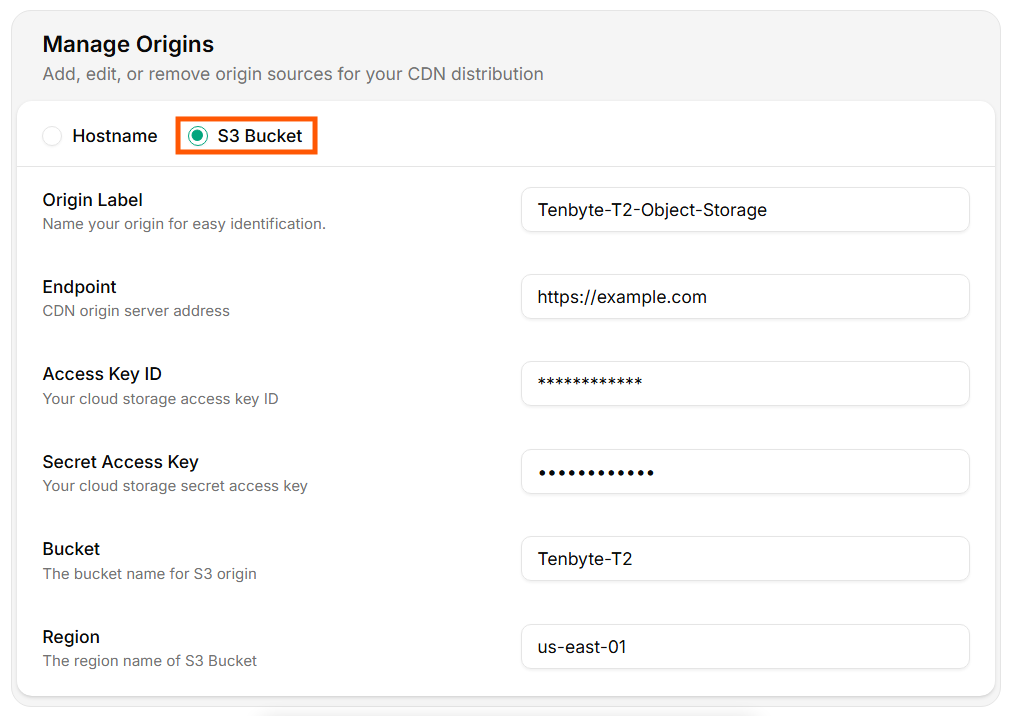 | Field | Example |
| ----------------------- | ---------------------------------------------- |
| **Origin Label** | `prod-assets-s3` |
| **Endpoint / Hostname** | `s3.us-east-1.amazonaws.com` |
| **Access Key ID** | from your IAM user / service account |
| **Secret Access Key** | injected once, stored encrypted |
| **Bucket** | bucket name only, no path |
| **Region** | bucket region (`us-east-1`, `eu-west-1`, etc.) |
### Endpoint cheat sheet
| Provider | Endpoint |
| --------------------- | --------------------------------------- |
| AWS S3 (regional) | `s3..amazonaws.com` |
| Cloudflare R2 | `.r2.cloudflarestorage.com` |
| DigitalOcean Spaces | `.digitaloceanspaces.com` |
| Backblaze B2 (S3 API) | `s3..backblazeb2.com` |
| Tenbyte T2 | `s3.tenbyte.io` |
| MinIO | your MinIO host |
### Least-privilege IAM
Use a **read-only** key scoped to the bucket / prefix you're serving. Example AWS policy:
```json theme={null}
{
"Version": "2012-10-17",
"Statement": [
{
"Effect": "Allow",
"Action": ["s3:GetObject", "s3:ListBucket"],
"Resource": [
"arn:aws:s3:::my-bucket",
"arn:aws:s3:::my-bucket/*"
]
}
]
}
```
### Verify before saving
```bash theme={null}
aws s3 ls "s3://my-bucket/" \
--endpoint-url "https://s3.us-east-1.amazonaws.com" \
--region us-east-1
aws s3api get-object \
--bucket my-bucket --key index.html \
--endpoint-url "https://s3.us-east-1.amazonaws.com" \
--region us-east-1 /tmp/out.html
```
If both work locally with the same key, the CDN will work too.
## Update origins
After editing fields, click **Update Origins**.
| Field | Example |
| ----------------------- | ---------------------------------------------- |
| **Origin Label** | `prod-assets-s3` |
| **Endpoint / Hostname** | `s3.us-east-1.amazonaws.com` |
| **Access Key ID** | from your IAM user / service account |
| **Secret Access Key** | injected once, stored encrypted |
| **Bucket** | bucket name only, no path |
| **Region** | bucket region (`us-east-1`, `eu-west-1`, etc.) |
### Endpoint cheat sheet
| Provider | Endpoint |
| --------------------- | --------------------------------------- |
| AWS S3 (regional) | `s3..amazonaws.com` |
| Cloudflare R2 | `.r2.cloudflarestorage.com` |
| DigitalOcean Spaces | `.digitaloceanspaces.com` |
| Backblaze B2 (S3 API) | `s3..backblazeb2.com` |
| Tenbyte T2 | `s3.tenbyte.io` |
| MinIO | your MinIO host |
### Least-privilege IAM
Use a **read-only** key scoped to the bucket / prefix you're serving. Example AWS policy:
```json theme={null}
{
"Version": "2012-10-17",
"Statement": [
{
"Effect": "Allow",
"Action": ["s3:GetObject", "s3:ListBucket"],
"Resource": [
"arn:aws:s3:::my-bucket",
"arn:aws:s3:::my-bucket/*"
]
}
]
}
```
### Verify before saving
```bash theme={null}
aws s3 ls "s3://my-bucket/" \
--endpoint-url "https://s3.us-east-1.amazonaws.com" \
--region us-east-1
aws s3api get-object \
--bucket my-bucket --key index.html \
--endpoint-url "https://s3.us-east-1.amazonaws.com" \
--region us-east-1 /tmp/out.html
```
If both work locally with the same key, the CDN will work too.
## Update origins
After editing fields, click **Update Origins**.
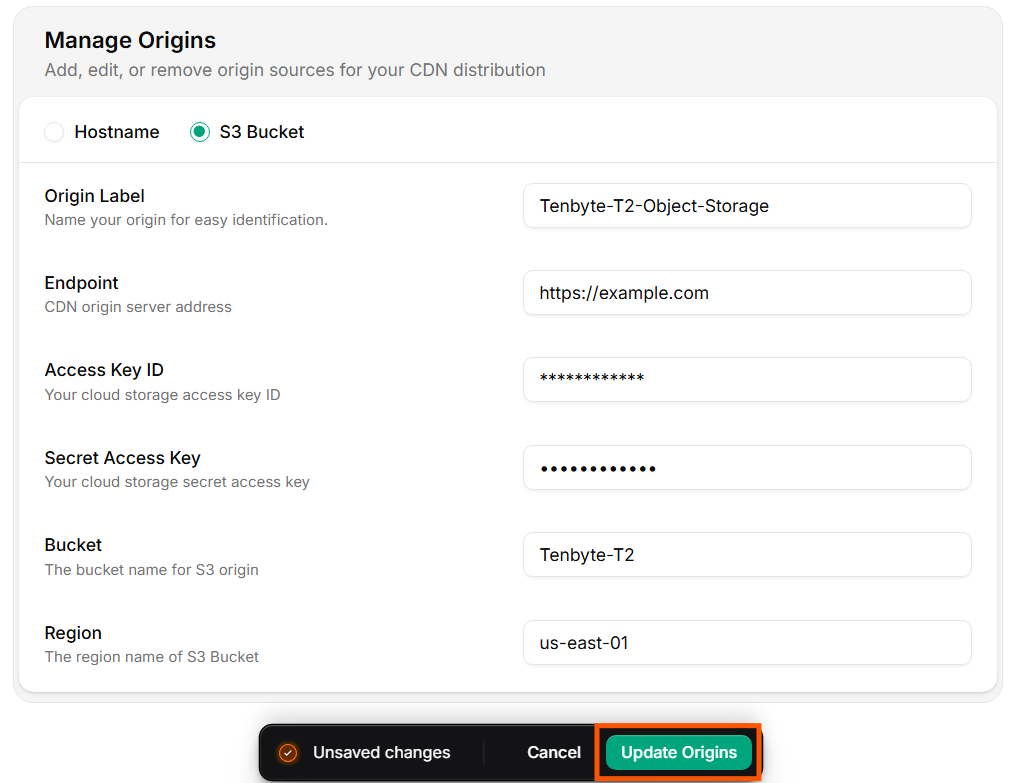 Distribution status flips to `Updating` until the new config rolls out (usually under a minute).
## Manage via API
```bash theme={null}
# Read current origin
curl -sS "https://api.tenbyte.io/cdn/distributions/$DISTRIBUTION_ID/origins" \
-H "Authorization: Bearer $TENBYTE_API_TOKEN" | jq
# Replace origin
curl -X PUT "https://api.tenbyte.io/cdn/distributions/$DISTRIBUTION_ID/origins" \
-H "Authorization: Bearer $TENBYTE_API_TOKEN" \
-H "Content-Type: application/json" \
-d '{
"type": "s3",
"label": "prod-assets-s3",
"hostname": "s3.us-east-1.amazonaws.com",
"bucket": "my-bucket",
"region": "us-east-1",
"access_key_id": "AKIA...",
"secret_access_key": "..."
}'
```
See [CDN API reference](/api-reference/cdn) for the exact field names.
## Rotate S3 keys safely
1. Create a new key pair on the IAM user (so two keys are active).
2. Update the origin via the console or API with the new key.
3. Confirm `x-cache: HIT` and a clean `MISS → HIT` transition for a fresh path.
4. Deactivate / delete the old key in IAM.
## Failure modes
| Symptom | Likely cause |
| --------------------------------------------- | ----------------------------------------------------------------------------------------------------------------------------- |
| `502 Bad Gateway` from CDN | Origin unreachable, port closed, TLS handshake failure. |
| `403` from S3 origin | Key missing `s3:GetObject` or bucket policy denies. |
| `404` for a known object | Bucket name wrong, region mismatch, or path includes the bucket prefix twice. |
| Origin returns content but CDN serves nothing | Origin sent `Cache-Control: private` and `Never Cache` is also set. Check [cache rules](/docs/cdn/distributions/cache-rules). |
| Wrong vhost served | Host header missing — configure it in [Headers](/docs/cdn/distributions/headers). |
Distribution status flips to `Updating` until the new config rolls out (usually under a minute).
## Manage via API
```bash theme={null}
# Read current origin
curl -sS "https://api.tenbyte.io/cdn/distributions/$DISTRIBUTION_ID/origins" \
-H "Authorization: Bearer $TENBYTE_API_TOKEN" | jq
# Replace origin
curl -X PUT "https://api.tenbyte.io/cdn/distributions/$DISTRIBUTION_ID/origins" \
-H "Authorization: Bearer $TENBYTE_API_TOKEN" \
-H "Content-Type: application/json" \
-d '{
"type": "s3",
"label": "prod-assets-s3",
"hostname": "s3.us-east-1.amazonaws.com",
"bucket": "my-bucket",
"region": "us-east-1",
"access_key_id": "AKIA...",
"secret_access_key": "..."
}'
```
See [CDN API reference](/api-reference/cdn) for the exact field names.
## Rotate S3 keys safely
1. Create a new key pair on the IAM user (so two keys are active).
2. Update the origin via the console or API with the new key.
3. Confirm `x-cache: HIT` and a clean `MISS → HIT` transition for a fresh path.
4. Deactivate / delete the old key in IAM.
## Failure modes
| Symptom | Likely cause |
| --------------------------------------------- | ----------------------------------------------------------------------------------------------------------------------------- |
| `502 Bad Gateway` from CDN | Origin unreachable, port closed, TLS handshake failure. |
| `403` from S3 origin | Key missing `s3:GetObject` or bucket policy denies. |
| `404` for a known object | Bucket name wrong, region mismatch, or path includes the bucket prefix twice. |
| Origin returns content but CDN serves nothing | Origin sent `Cache-Control: private` and `Never Cache` is also set. Check [cache rules](/docs/cdn/distributions/cache-rules). |
| Wrong vhost served | Host header missing — configure it in [Headers](/docs/cdn/distributions/headers). |