> ## Documentation Index
> Fetch the complete documentation index at: https://docs.tenbyte.io/llms.txt
> Use this file to discover all available pages before exploring further.
# Create a CDN Distribution
> Create a Tenbyte CDN distribution from the console or API. Covers domain setup, cache strategy, origin types, and host header config.
A **distribution** is the CDN endpoint your users hit. It maps a hostname to one or more origins, applies cache and access rules, and serves traffic from edge PoPs.
## Prerequisites
* A reachable origin (HTTPS hostname, IP, or S3-compatible bucket).
* DNS access if you plan to use a custom domain (you'll add a CNAME).
* An API token if creating distributions from CI/CD.
## Steps
Use a clear, environment-prefixed name (`prod-web`, `staging-images`). Names show up in audit logs and metrics.
System-generated for quick tests, custom domain for production.
Static, VOD, livestream, or dynamic — sets sensible TTL defaults you can override later.
Hostname, IP, or S3-compatible bucket.
Custom Host header for virtual-hosted origins.
`curl -I` the distribution domain and confirm a `200`.
## Domain type
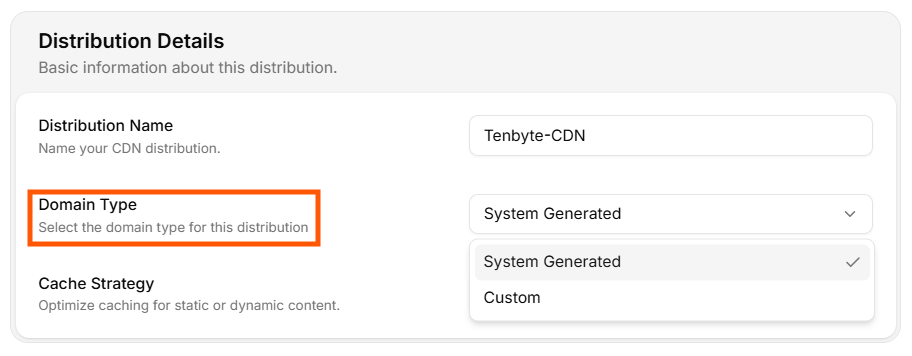 | Option | When to use |
| -------------------- | ---------------------------------------------------------------------------------------------------- |
| **System Generated** | Quick test, internal tools, or when DNS isn't ready. Tenbyte gives you a `.tenbytecdn.com` host. |
| **Custom** | Production. Add `cdn.yoursite.com` and CNAME it to the system-generated host. |
For a custom domain, create a DNS record like:
```text theme={null}
cdn.yoursite.com. 300 IN CNAME your-distribution.tenbytecdn.com.
```
Issue an SSL cert in [SSL](/docs/cdn/distributions/ssl) before going live.
## Cache strategy
| Option | When to use |
| -------------------- | ---------------------------------------------------------------------------------------------------- |
| **System Generated** | Quick test, internal tools, or when DNS isn't ready. Tenbyte gives you a `.tenbytecdn.com` host. |
| **Custom** | Production. Add `cdn.yoursite.com` and CNAME it to the system-generated host. |
For a custom domain, create a DNS record like:
```text theme={null}
cdn.yoursite.com. 300 IN CNAME your-distribution.tenbytecdn.com.
```
Issue an SSL cert in [SSL](/docs/cdn/distributions/ssl) before going live.
## Cache strategy
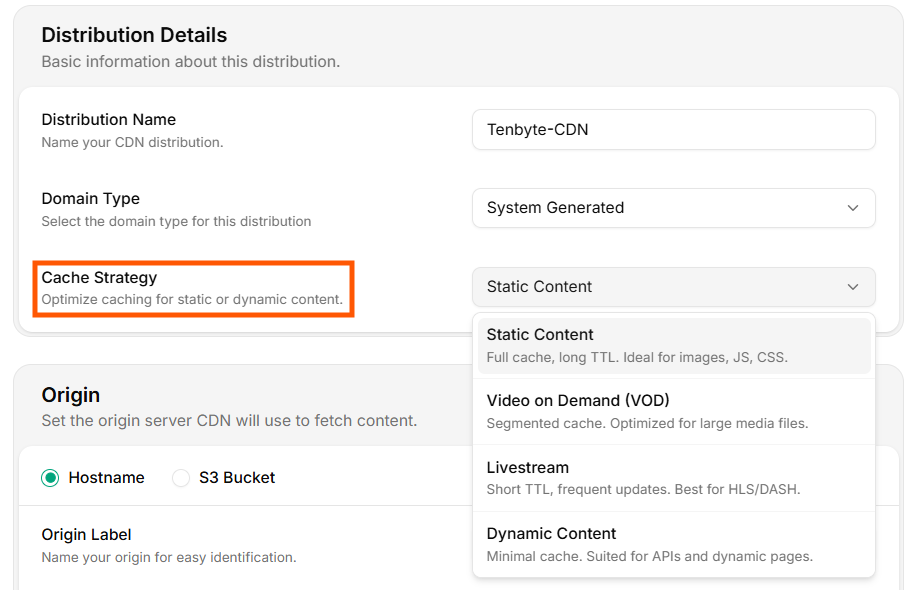 | Strategy | Default TTL profile | Use for |
| -------------- | ------------------------------------- | ------------------------- |
| **Static** | Long TTL, full cache | Images, JS, CSS, fonts |
| **VOD** | Segmented cache, large object support | MP4, HLS / DASH on-demand |
| **Livestream** | Short TTL, frequent refresh | HLS / DASH live segments |
| **Dynamic** | Minimal cache | API responses, SSR pages |
The strategy seeds defaults; you can still add fine-grained [cache rules](/docs/cdn/distributions/cache-rules) per path.
## Origin
The origin is the upstream the CDN pulls from on cache miss. Pick one of two types.
### Hostname origin
| Strategy | Default TTL profile | Use for |
| -------------- | ------------------------------------- | ------------------------- |
| **Static** | Long TTL, full cache | Images, JS, CSS, fonts |
| **VOD** | Segmented cache, large object support | MP4, HLS / DASH on-demand |
| **Livestream** | Short TTL, frequent refresh | HLS / DASH live segments |
| **Dynamic** | Minimal cache | API responses, SSR pages |
The strategy seeds defaults; you can still add fine-grained [cache rules](/docs/cdn/distributions/cache-rules) per path.
## Origin
The origin is the upstream the CDN pulls from on cache miss. Pick one of two types.
### Hostname origin
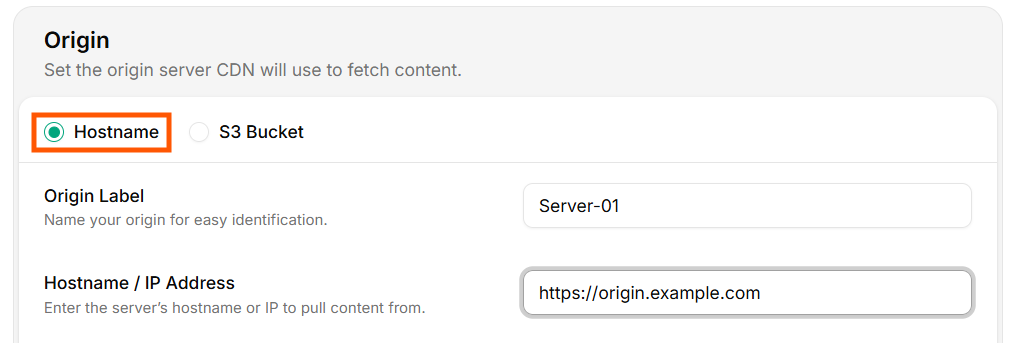 * **Origin Label** — internal name.
* **Hostname / IP** — must be reachable over HTTPS or HTTP.
### S3-compatible origin
* **Origin Label** — internal name.
* **Hostname / IP** — must be reachable over HTTPS or HTTP.
### S3-compatible origin
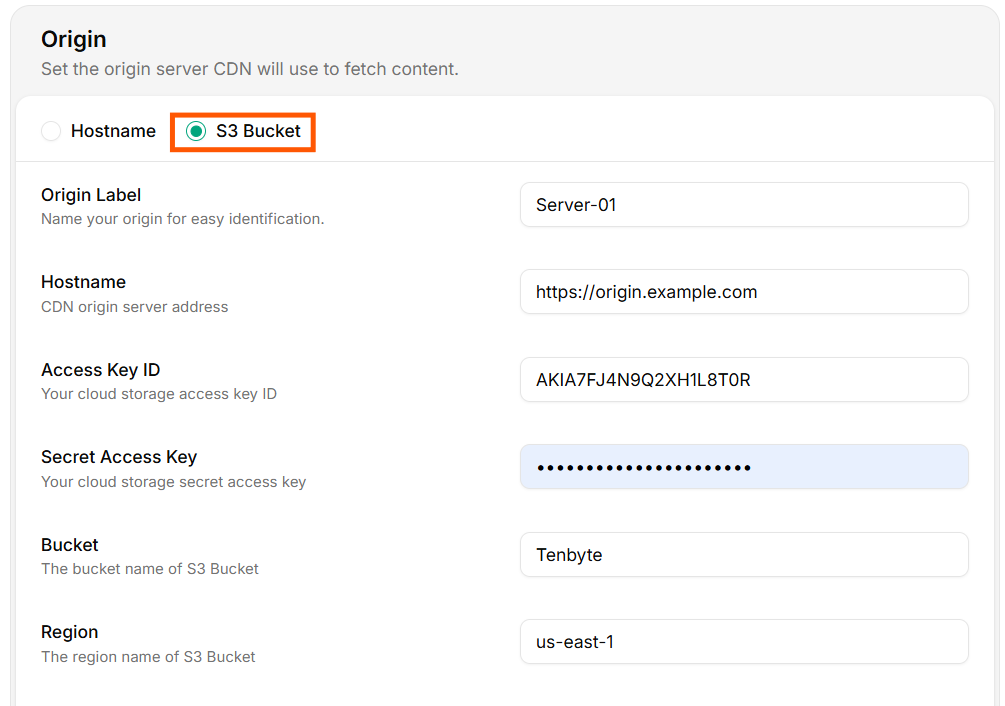 * **Origin Label** — internal name.
* **Hostname** — endpoint of the S3-compatible service (e.g. `s3.amazonaws.com`, `s3.us-east-1.amazonaws.com`, `nyc3.digitaloceanspaces.com`).
* **Access Key ID** / **Secret Access Key** — credentials with read access to the bucket.
* **Bucket** — bucket name.
* **Region** — bucket region.
Use a **read-only** IAM user/key. Never reuse a key with write or delete permissions. Rotate the key periodically — Tenbyte's signed-fetch logic handles rotation transparently if you update both fields together.
Verify the origin can be read with the same credentials:
```bash theme={null}
aws s3 ls "s3://my-bucket/" \
--endpoint-url "https://s3.us-east-1.amazonaws.com" \
--region us-east-1
```
## Advanced settings
* **Origin Label** — internal name.
* **Hostname** — endpoint of the S3-compatible service (e.g. `s3.amazonaws.com`, `s3.us-east-1.amazonaws.com`, `nyc3.digitaloceanspaces.com`).
* **Access Key ID** / **Secret Access Key** — credentials with read access to the bucket.
* **Bucket** — bucket name.
* **Region** — bucket region.
Use a **read-only** IAM user/key. Never reuse a key with write or delete permissions. Rotate the key periodically — Tenbyte's signed-fetch logic handles rotation transparently if you update both fields together.
Verify the origin can be read with the same credentials:
```bash theme={null}
aws s3 ls "s3://my-bucket/" \
--endpoint-url "https://s3.us-east-1.amazonaws.com" \
--region us-east-1
```
## Advanced settings
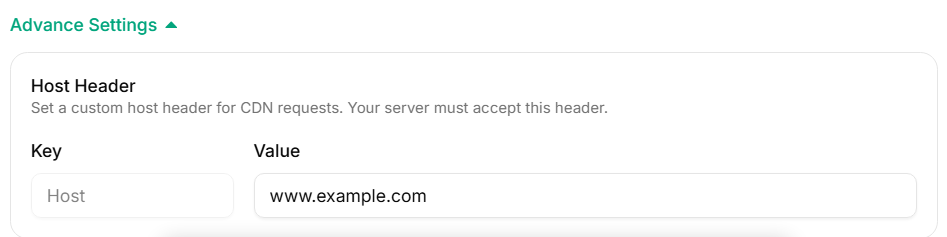 The **Host header** is what the origin sees in `Host:`. Set it explicitly when:
* Your origin uses virtual hosting (multiple sites on one IP).
* The origin's TLS cert is issued for a specific hostname.
* A reverse proxy or load balancer routes by Host.
| Field | Example |
| ----- | --------------------- |
| Key | `Host` |
| Value | `origin.yoursite.com` |
## Verify the distribution
```bash theme={null}
export CDN_HOST="https://your-distribution.tenbytecdn.com"
curl -sSI "$CDN_HOST/" | grep -iE 'http/|x-cache|server'
```
Expected:
```text theme={null}
HTTP/2 200
x-cache: MISS # first request
server: tenbyte-cdn
```
Repeat the call. `x-cache` should flip to `HIT`.
## Create via API
```bash theme={null}
curl -X POST "https://api.tenbyte.io/cdn/distributions" \
-H "Authorization: Bearer $TENBYTE_API_TOKEN" \
-H "Content-Type: application/json" \
-d '{
"name": "prod-web",
"domain_type": "system",
"cache_strategy": "static",
"origin": {
"type": "hostname",
"label": "origin-prod",
"hostname": "origin.yoursite.com"
}
}'
```
See the [CDN API reference](/api-reference/cdn) for the full schema and updated field names.
## Common pitfalls
| Symptom | Cause |
| ----------------------------- | --------------------------------------------------------------------------------------------------------------------- |
| `502 Bad Gateway` from CDN | Origin unreachable, wrong port, or TLS cert mismatch. Check origin from outside your network. |
| `403` from S3 origin | Credentials missing `s3:GetObject` on the bucket / prefix. |
| Wrong content served | Custom Host header missing — virtual host routing on origin picks the default vhost. |
| `x-cache: MISS` every request | Origin sends `Cache-Control: no-store` or `private`. Override via [cache rules](/docs/cdn/distributions/cache-rules). |
The **Host header** is what the origin sees in `Host:`. Set it explicitly when:
* Your origin uses virtual hosting (multiple sites on one IP).
* The origin's TLS cert is issued for a specific hostname.
* A reverse proxy or load balancer routes by Host.
| Field | Example |
| ----- | --------------------- |
| Key | `Host` |
| Value | `origin.yoursite.com` |
## Verify the distribution
```bash theme={null}
export CDN_HOST="https://your-distribution.tenbytecdn.com"
curl -sSI "$CDN_HOST/" | grep -iE 'http/|x-cache|server'
```
Expected:
```text theme={null}
HTTP/2 200
x-cache: MISS # first request
server: tenbyte-cdn
```
Repeat the call. `x-cache` should flip to `HIT`.
## Create via API
```bash theme={null}
curl -X POST "https://api.tenbyte.io/cdn/distributions" \
-H "Authorization: Bearer $TENBYTE_API_TOKEN" \
-H "Content-Type: application/json" \
-d '{
"name": "prod-web",
"domain_type": "system",
"cache_strategy": "static",
"origin": {
"type": "hostname",
"label": "origin-prod",
"hostname": "origin.yoursite.com"
}
}'
```
See the [CDN API reference](/api-reference/cdn) for the full schema and updated field names.
## Common pitfalls
| Symptom | Cause |
| ----------------------------- | --------------------------------------------------------------------------------------------------------------------- |
| `502 Bad Gateway` from CDN | Origin unreachable, wrong port, or TLS cert mismatch. Check origin from outside your network. |
| `403` from S3 origin | Credentials missing `s3:GetObject` on the bucket / prefix. |
| Wrong content served | Custom Host header missing — virtual host routing on origin picks the default vhost. |
| `x-cache: MISS` every request | Origin sends `Cache-Control: no-store` or `private`. Override via [cache rules](/docs/cdn/distributions/cache-rules). |