> ## Documentation Index
> Fetch the complete documentation index at: https://docs.tenbyte.io/llms.txt
> Use this file to discover all available pages before exploring further.
# Access Rules Overview
> Set up access control for your Tenbyte CDN distribution with country, IP, referrer, and token-based restrictions.
Access rules let you control who can fetch content from your Tenbyte CDN distribution. Each rule scopes a set of policies (country, IP, referrer, and token authentication) to a path prefix or regex pattern, so different parts of your distribution can have different protections.
## How access rules work
* A distribution can have multiple access rules.
* Each rule targets a URL pattern (prefix or regex).
* Within a rule, you can enable any combination of the four policies below.
* Requests that match the pattern must satisfy every enabled policy on that rule.
| Policy | Use case |
| ------------------------------------------------------------------------------------- | ---------------------------------------------------- |
| [Country Access Policy](/docs/cdn/distributions/access-rules/country-access-policy) | Geo-block or geo-allow regions |
| [IP Access Policy](/docs/cdn/distributions/access-rules/ip-access-policy) | Allow or block specific IPs / CIDR ranges |
| [Referrer Access Policy](/docs/cdn/distributions/access-rules/referrer-access-policy) | Stop hotlinking from other domains |
| [Token Authentication](/docs/cdn/distributions/access-rules/token-authentication) | Issue time-limited signed URLs for protected content |
## General Info
The **General Info** section defines the rule name, type, and matching pattern.
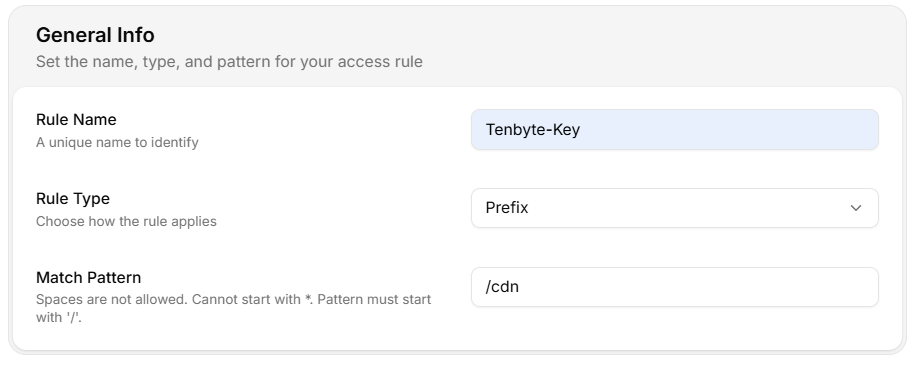 * **Rule Name** — unique identifier for the rule.
* **Rule Type** — how the match pattern is interpreted:
1. **Prefix** — applies to URLs that begin with the pattern.
2. **Regex** — applies to URLs matching the regular expression.
* **Match Pattern** — the path or pattern the rule applies to.
Spaces are not allowed, the pattern cannot start with `*`, and it must start with `/`.
## Create an access rule
1. Open **CDN** → **Distributions** → select your distribution.
2. Go to **Access Rules** → **Add Access Rules**.
3. Fill in **Rule Name**, **Rule Type**, and **Match Pattern**.
4. Toggle on the policies you want to enforce and configure each.
5. Click **Create Access Rules**.
* **Rule Name** — unique identifier for the rule.
* **Rule Type** — how the match pattern is interpreted:
1. **Prefix** — applies to URLs that begin with the pattern.
2. **Regex** — applies to URLs matching the regular expression.
* **Match Pattern** — the path or pattern the rule applies to.
Spaces are not allowed, the pattern cannot start with `*`, and it must start with `/`.
## Create an access rule
1. Open **CDN** → **Distributions** → select your distribution.
2. Go to **Access Rules** → **Add Access Rules**.
3. Fill in **Rule Name**, **Rule Type**, and **Match Pattern**.
4. Toggle on the policies you want to enforce and configure each.
5. Click **Create Access Rules**.