> ## Documentation Index
> Fetch the complete documentation index at: https://docs.tenbyte.io/llms.txt
> Use this file to discover all available pages before exploring further.
# Upload a Custom SSL Certificate
> Upload a TLS certificate, private key, and intermediate chain in PEM format. Includes verification commands and rotation flow.
Use a custom certificate when you need EV / OV identity, a wildcard, an internal CA, or a cert your security team manages. You upload PEM-format material and the edge installs it.
For free DV certs, use [Let's Encrypt](/docs/cdn/certificates/lets-encrypt) — it auto-renews.
## Prerequisites
* Custom domain CNAMEs to your distribution.
* Cert files in **PEM** format:
* Server certificate (with `BEGIN CERTIFICATE` / `END CERTIFICATE` lines).
* Private key (with `BEGIN PRIVATE KEY` / `END PRIVATE KEY`).
* Intermediate / chain (one or more PEM blocks concatenated).
* Cert covers the hostname (CN or SAN match).
## Validate locally before uploading
```bash theme={null}
# 1. Subject and SANs cover the hostname
openssl x509 -in cert.pem -noout -subject -ext subjectAltName
# 2. Cert and key match
openssl x509 -in cert.pem -noout -modulus | openssl md5
openssl rsa -in key.pem -noout -modulus | openssl md5
# both md5 hashes must be identical
# 3. Chain validates
openssl verify -CAfile chain.pem cert.pem
# cert.pem: OK
# 4. Expiry
openssl x509 -in cert.pem -noout -dates
```
If any step fails, fix locally before uploading — the upload form does the same checks.
## Upload via console
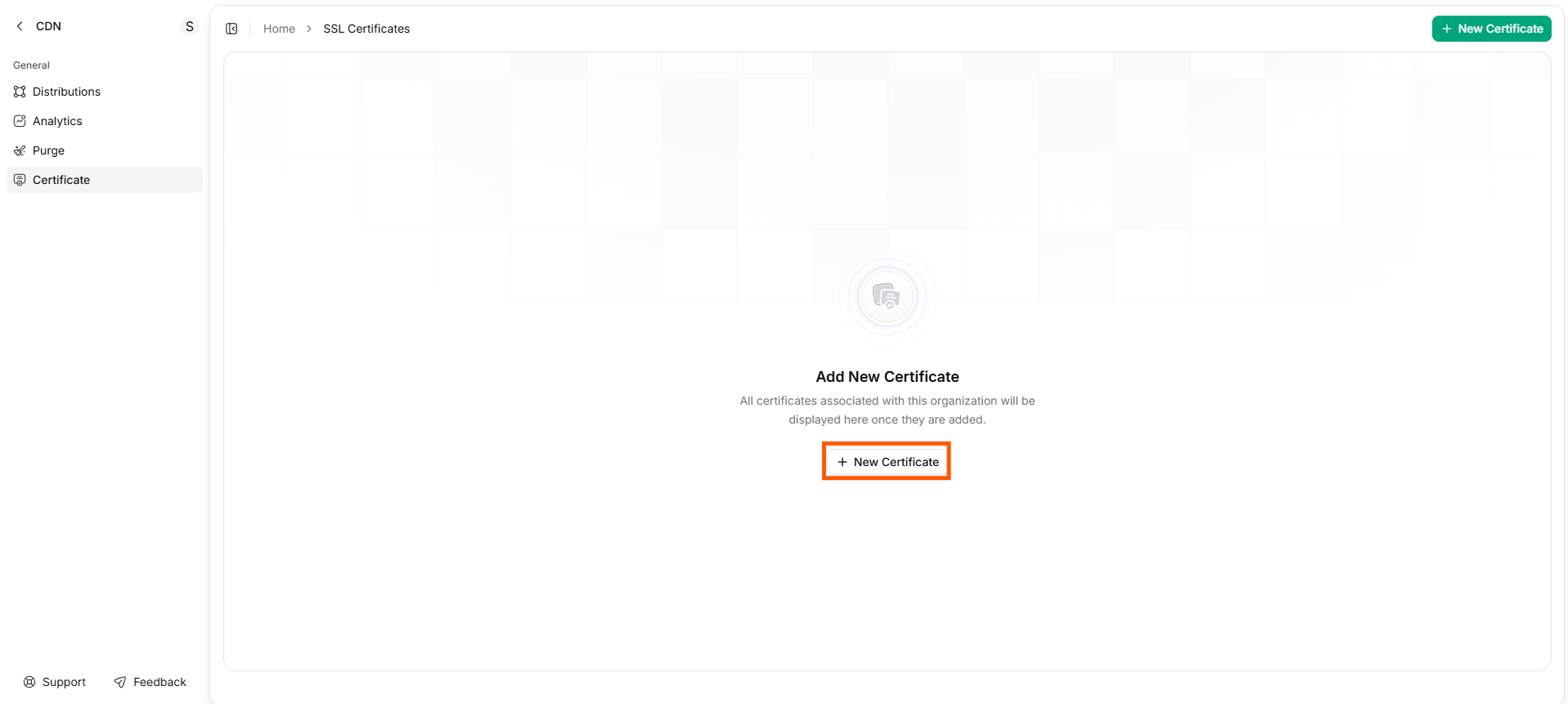
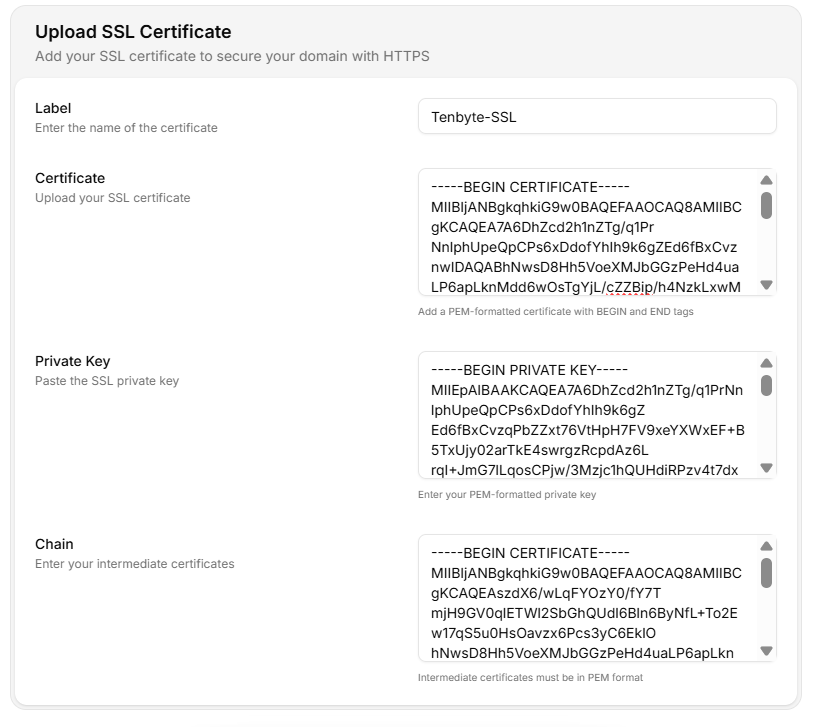 | Field | Value |
| --------------- | --------------------------------------------------------------------- |
| **Label** | Internal name (`prod-2026-wildcard`). Include year for easy rotation. |
| **Certificate** | Paste the server cert PEM. |
| **Private Key** | Paste the private key PEM. |
| **Chain** | Paste intermediate certs PEM (root not required). |
| Field | Value |
| --------------- | --------------------------------------------------------------------- |
| **Label** | Internal name (`prod-2026-wildcard`). Include year for easy rotation. |
| **Certificate** | Paste the server cert PEM. |
| **Private Key** | Paste the private key PEM. |
| **Chain** | Paste intermediate certs PEM (root not required). |
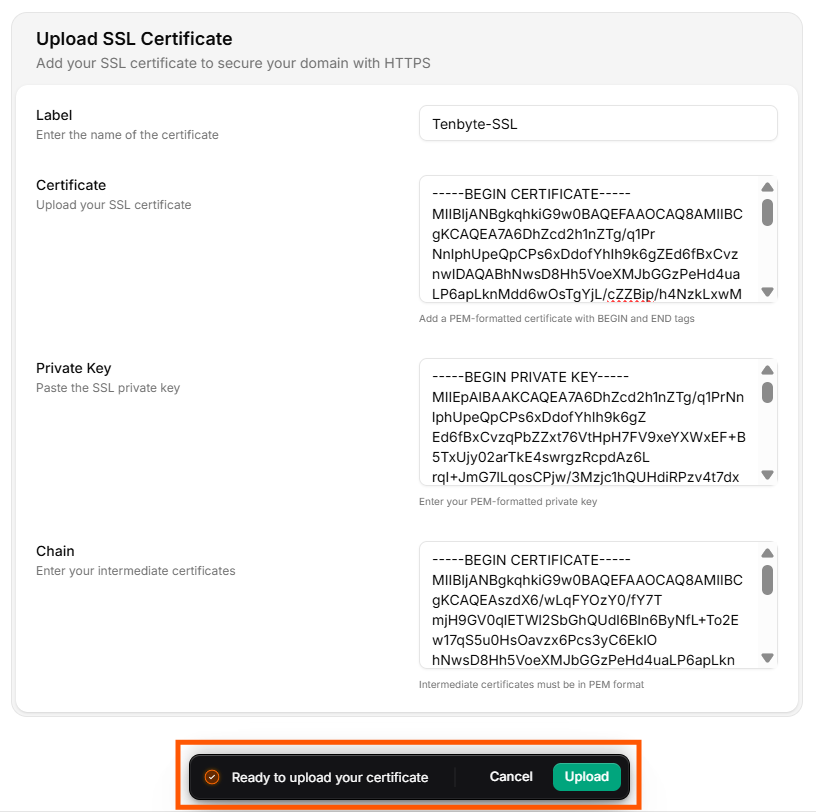 Tenbyte validates the cert/key match and chain order. On success, attach the cert to your distribution from the **SSL** tab.
## Upload via API
```bash theme={null}
curl -X POST "https://api.tenbyte.io/cdn/certificates" \
-H "Authorization: Bearer $TENBYTE_API_TOKEN" \
-H "Content-Type: application/json" \
-d "$(jq -n \
--arg label 'prod-2026-wildcard' \
--arg cert "$(cat cert.pem)" \
--arg key "$(cat key.pem)" \
--arg chain "$(cat chain.pem)" \
'{label: $label, certificate: $cert, private_key: $key, chain: $chain}')"
```
Attach to a distribution:
```bash theme={null}
curl -X PUT "https://api.tenbyte.io/cdn/distributions/$DISTRIBUTION_ID/ssl" \
-H "Authorization: Bearer $TENBYTE_API_TOKEN" \
-H "Content-Type: application/json" \
-d '{"type": "custom", "certificate_id": "cert_..."}'
```
See the [CDN API reference](/api-reference/cdn) for canonical fields.
## Verify
```bash theme={null}
openssl s_client -connect cdn.yoursite.com:443 -servername cdn.yoursite.com /dev/null | openssl x509 -noout -subject -issuer -dates
```
Confirm `subject` matches your domain and `notAfter` is the expected date.
## Rotation runbook
Custom certs do **not** auto-renew. You must replace before `notAfter`.
| When | Action |
| ------------------ | -------------------------------------------------------------------------------------------------------------------------------- |
| 30 d before expiry | Calendar reminder fires. Order / generate new cert. |
| 14 d before expiry | Upload new cert via console / API. **Do not detach the old one yet.** |
| 7 d before expiry | Switch the distribution's SSL config to the new `certificate_id`. Verify: `openssl s_client` and SSL Labs. |
| Immediately after | Watch [response classes](/docs/cdn/analytics/response-classes) for unexpected 5xx — rare but possible if the new chain is wrong. |
| Old cert expired | Delete the old cert from the certificate store. |
Never replace a private key on a hot endpoint without a tested rollback. Keep the previous cert + key around for at least one rollback window.
## Common formats and conversions
| You have | Convert to PEM |
| --------------------- | ------------------------------------------------------------------------------------------- |
| `.pfx` / `.p12` | `openssl pkcs12 -in cert.pfx -nodes -out combined.pem`, then split into cert / key / chain. |
| `.cer` (DER) | `openssl x509 -inform DER -in cert.cer -out cert.pem` |
| Private key encrypted | `openssl rsa -in key.pem -out key.pem` (writes unencrypted — handle carefully). |
| Chain order wrong | Concatenate as: leaf → intermediate(s) → (omit root). |
## Troubleshooting
| Symptom | Fix |
| ----------------------------------------------- | ------------------------------------------------------------------------------------------------------- |
| Upload rejected — `cert/key mismatch` | The key doesn't match this cert. Re-export both from the same source. |
| Upload rejected — `chain incomplete` | Add the issuing intermediate(s). Test with `openssl verify -CAfile chain.pem cert.pem`. |
| Browser shows `NET::ERR_CERT_AUTHORITY_INVALID` | Chain missing or out of order. Reconcatenate leaf → intermediates. |
| `notAfter` already passed at upload | Generate / order a new cert; you can't upload an expired one. |
| Wildcard cert not matching subdomain | Wildcard covers one level only — `*.example.com` doesn't match `a.b.example.com`. Use a multi-SAN cert. |
## Related
* [SSL Overview](/docs/cdn/certificates/ssl-overview) — pick the right cert type.
* [SSL settings](/docs/cdn/distributions/ssl) — attach the cert and toggle protocols.
* [Headers](/docs/cdn/distributions/headers) — add HSTS once HTTPS is verified.
Tenbyte validates the cert/key match and chain order. On success, attach the cert to your distribution from the **SSL** tab.
## Upload via API
```bash theme={null}
curl -X POST "https://api.tenbyte.io/cdn/certificates" \
-H "Authorization: Bearer $TENBYTE_API_TOKEN" \
-H "Content-Type: application/json" \
-d "$(jq -n \
--arg label 'prod-2026-wildcard' \
--arg cert "$(cat cert.pem)" \
--arg key "$(cat key.pem)" \
--arg chain "$(cat chain.pem)" \
'{label: $label, certificate: $cert, private_key: $key, chain: $chain}')"
```
Attach to a distribution:
```bash theme={null}
curl -X PUT "https://api.tenbyte.io/cdn/distributions/$DISTRIBUTION_ID/ssl" \
-H "Authorization: Bearer $TENBYTE_API_TOKEN" \
-H "Content-Type: application/json" \
-d '{"type": "custom", "certificate_id": "cert_..."}'
```
See the [CDN API reference](/api-reference/cdn) for canonical fields.
## Verify
```bash theme={null}
openssl s_client -connect cdn.yoursite.com:443 -servername cdn.yoursite.com /dev/null | openssl x509 -noout -subject -issuer -dates
```
Confirm `subject` matches your domain and `notAfter` is the expected date.
## Rotation runbook
Custom certs do **not** auto-renew. You must replace before `notAfter`.
| When | Action |
| ------------------ | -------------------------------------------------------------------------------------------------------------------------------- |
| 30 d before expiry | Calendar reminder fires. Order / generate new cert. |
| 14 d before expiry | Upload new cert via console / API. **Do not detach the old one yet.** |
| 7 d before expiry | Switch the distribution's SSL config to the new `certificate_id`. Verify: `openssl s_client` and SSL Labs. |
| Immediately after | Watch [response classes](/docs/cdn/analytics/response-classes) for unexpected 5xx — rare but possible if the new chain is wrong. |
| Old cert expired | Delete the old cert from the certificate store. |
Never replace a private key on a hot endpoint without a tested rollback. Keep the previous cert + key around for at least one rollback window.
## Common formats and conversions
| You have | Convert to PEM |
| --------------------- | ------------------------------------------------------------------------------------------- |
| `.pfx` / `.p12` | `openssl pkcs12 -in cert.pfx -nodes -out combined.pem`, then split into cert / key / chain. |
| `.cer` (DER) | `openssl x509 -inform DER -in cert.cer -out cert.pem` |
| Private key encrypted | `openssl rsa -in key.pem -out key.pem` (writes unencrypted — handle carefully). |
| Chain order wrong | Concatenate as: leaf → intermediate(s) → (omit root). |
## Troubleshooting
| Symptom | Fix |
| ----------------------------------------------- | ------------------------------------------------------------------------------------------------------- |
| Upload rejected — `cert/key mismatch` | The key doesn't match this cert. Re-export both from the same source. |
| Upload rejected — `chain incomplete` | Add the issuing intermediate(s). Test with `openssl verify -CAfile chain.pem cert.pem`. |
| Browser shows `NET::ERR_CERT_AUTHORITY_INVALID` | Chain missing or out of order. Reconcatenate leaf → intermediates. |
| `notAfter` already passed at upload | Generate / order a new cert; you can't upload an expired one. |
| Wildcard cert not matching subdomain | Wildcard covers one level only — `*.example.com` doesn't match `a.b.example.com`. Use a multi-SAN cert. |
## Related
* [SSL Overview](/docs/cdn/certificates/ssl-overview) — pick the right cert type.
* [SSL settings](/docs/cdn/distributions/ssl) — attach the cert and toggle protocols.
* [Headers](/docs/cdn/distributions/headers) — add HSTS once HTTPS is verified.